> ## Documentation Index
> Fetch the complete documentation index at: https://docs.forge.ai/llms.txt
> Use this file to discover all available pages before exploring further.
# Costs
> Review gateway charges, native AI usage, and estimated AI subscriptions together.
Open **Observe > Costs** to review AI spending across your organization.
Gateway Spend continues to show gateway traffic alone.
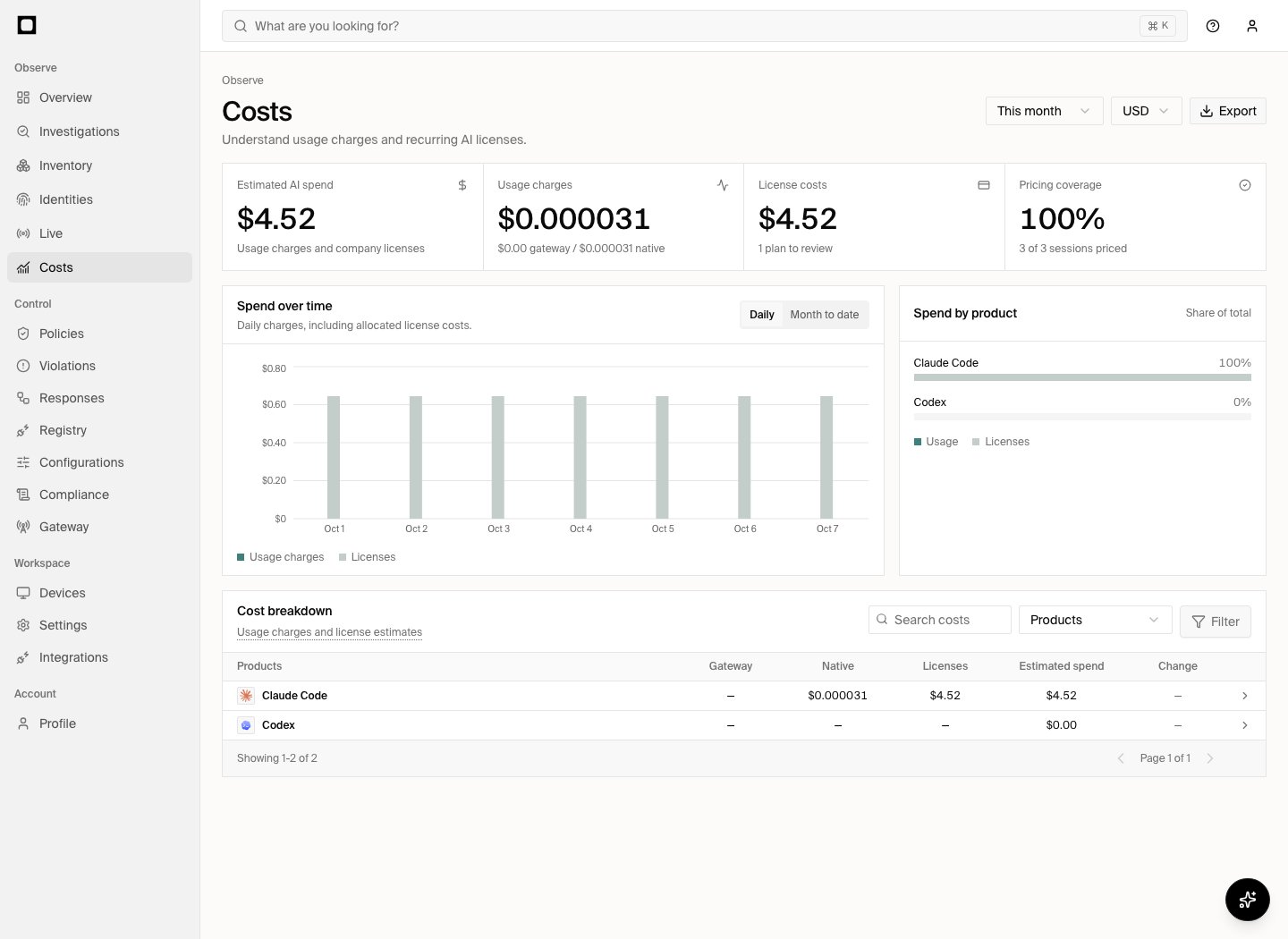 Use **Daily** or **Month to date** to view usage charges and allocated licenses.
The cost breakdown uses the same compact table as Gateway Spend. Search, group,
and filter the report there; use **Export** for a summary or individual records.
Hover or keyboard-focus the dotted-underlined breakdown subtitle for estimate
semantics and excluded costs.
The change column compares the selected dates with the immediately preceding
period of the same length. A dash means no comparison is available.
## Understand the totals
The report separates gateway usage, direct usage charges, and AI licenses.
Gateway charges use the originating AI product when known, or the model
provider’s catalog product otherwise. MCP traffic is excluded from AI cost
coverage. Live sessions use the same catalog product identities. Violations
identify the provider for the violating request when its request identity is
available, while preserving a known originating application. Gateway Spend
continues to group charges by provider and model. Product details and identity
usage include every observed provider in a session without multiplying the
organization’s session total. New gateway activity refreshes Inventory through
the existing background projection.
Cloud gateway traffic uses the billed cloud product: Amazon Bedrock, Azure
OpenAI, Azure AI Foundry, or Vertex AI. Using an Anthropic model through Bedrock
therefore attributes its charge to Amazon Bedrock. A compatible custom endpoint
is not identified as OpenAI or Anthropic from its wire protocol alone.
Daily bars allocate
subscriptions over their service period. Selecting **Month
to date** shows the accumulated amount. Product rows show the same breakdown.
All filters apply to the metrics, charts, product ranking, and table. Choose a
date range, search, or filter by product, person, team, provider, or cost type.
Group the table by product, team, person, provider, or billing account.
Report dates use UTC.
Currencies are reported separately. Forge does not convert a foreign-currency
subscription into your selected currency.
These estimates are not invoices. Taxes, negotiated discounts, regional
pricing, and usage that Forge did not observe can change the billed amount.
## Direct usage
Direct usage is AI usage observed outside a gateway. Forge prefers counters
reported by a connected provider or developer tool.
Supported Claude Code and Codex records include input, output, and cache
tokens. Supported captured Anthropic Messages and Codex Responses traffic can
also supply usage. Replayed observations and cumulative snapshots do not add
the same usage twice.
Pricing uses the observed model and a versioned model-price catalog. Provider
charges take precedence when available. A missing model or incomplete record
remains unpriced. Cursor observations without reported usage are unpriced;
visible conversation text does not establish the complete billable context.
MCP tool traffic is excluded.
Subscription-included inference is **usage value** at an equivalent API price.
It is not added to usage charges. Usage with unknown billing ownership stays
separate until ownership is established.
Pricing coverage measures eligible observed sessions with a known pricing
basis. It does not measure estimate accuracy. Use its link to review sessions
that need a price. Live keeps its own selected time range.
## AI license estimates
Inventory observations identify candidate AI products and their users. A
detected application alone does not establish a paid subscription, plan,
payer, or assigned seat.
Open a product and expand **Licenses and pricing** to review candidates. An organization
administrator can select a plan, confirm the payer, and correct the price,
currency, billing interval, quantity, and effective service period. Only
confirmed company-paid estimates contribute to license spend.
Search people or billing accounts and filter by **Needs review**, **Confirmed**,
or **Inactive**. The license table loads 50 assignments per page. Select a plan
or **Confirm** in a row to edit one assignment.
To update many people, select rows and choose **Set pricing**. Select the page
checkbox, then **Select all matching** to include every matching assignment
across pages. Review the count on the save button before applying the price,
payer, and service dates. Seat counts and billing accounts are preserved.
Use **Needs review** to confirm new assignments without changing previously
confirmed prices. These updates affect existing assignments; newly detected
licenses still require confirmation.
Published plan prices retain their source and collection date. Quote-only,
bundled, promotional, or ambiguous prices remain unknown. Ordinary software
licenses are excluded. You can supply your AI-specific contract price instead.
Microsoft 365 Copilot's catalog includes standalone AI add-on baselines: Business
at USD 252 per user/year or USD 25.20 per user/month, and Microsoft 365 Copilot
at USD 360 per user/year. These exclude the prerequisite Microsoft 365 suite.
Use a custom price for a negotiated or promotional rate.
Shared subscriptions are counted once when their account identity is known.
Installing the same AI product on several devices does not create several
licenses. Unknown account relationships are not assumed to share a license.
Annual prices use the annual total, allocated over the annual service period.
Changing a future price preserves earlier service periods. Use **Advanced >
Billing account** to identify a shared subscription explicitly.
## Review and export
Open a product row for its breakdown and license estimates. Use the pricing
coverage link to review sessions that need a price.
Export the summary or underlying records as separate CSVs using the current
report filters.
License review applies to products with supported subscription plans. API usage alone does not imply a paid subscription.
This documentation is built and hosted on [Mintlify](https://mintlify.com), a developer documentation platform.
Use **Daily** or **Month to date** to view usage charges and allocated licenses.
The cost breakdown uses the same compact table as Gateway Spend. Search, group,
and filter the report there; use **Export** for a summary or individual records.
Hover or keyboard-focus the dotted-underlined breakdown subtitle for estimate
semantics and excluded costs.
The change column compares the selected dates with the immediately preceding
period of the same length. A dash means no comparison is available.
## Understand the totals
The report separates gateway usage, direct usage charges, and AI licenses.
Gateway charges use the originating AI product when known, or the model
provider’s catalog product otherwise. MCP traffic is excluded from AI cost
coverage. Live sessions use the same catalog product identities. Violations
identify the provider for the violating request when its request identity is
available, while preserving a known originating application. Gateway Spend
continues to group charges by provider and model. Product details and identity
usage include every observed provider in a session without multiplying the
organization’s session total. New gateway activity refreshes Inventory through
the existing background projection.
Cloud gateway traffic uses the billed cloud product: Amazon Bedrock, Azure
OpenAI, Azure AI Foundry, or Vertex AI. Using an Anthropic model through Bedrock
therefore attributes its charge to Amazon Bedrock. A compatible custom endpoint
is not identified as OpenAI or Anthropic from its wire protocol alone.
Daily bars allocate
subscriptions over their service period. Selecting **Month
to date** shows the accumulated amount. Product rows show the same breakdown.
All filters apply to the metrics, charts, product ranking, and table. Choose a
date range, search, or filter by product, person, team, provider, or cost type.
Group the table by product, team, person, provider, or billing account.
Report dates use UTC.
Currencies are reported separately. Forge does not convert a foreign-currency
subscription into your selected currency.
These estimates are not invoices. Taxes, negotiated discounts, regional
pricing, and usage that Forge did not observe can change the billed amount.
## Direct usage
Direct usage is AI usage observed outside a gateway. Forge prefers counters
reported by a connected provider or developer tool.
Supported Claude Code and Codex records include input, output, and cache
tokens. Supported captured Anthropic Messages and Codex Responses traffic can
also supply usage. Replayed observations and cumulative snapshots do not add
the same usage twice.
Pricing uses the observed model and a versioned model-price catalog. Provider
charges take precedence when available. A missing model or incomplete record
remains unpriced. Cursor observations without reported usage are unpriced;
visible conversation text does not establish the complete billable context.
MCP tool traffic is excluded.
Subscription-included inference is **usage value** at an equivalent API price.
It is not added to usage charges. Usage with unknown billing ownership stays
separate until ownership is established.
Pricing coverage measures eligible observed sessions with a known pricing
basis. It does not measure estimate accuracy. Use its link to review sessions
that need a price. Live keeps its own selected time range.
## AI license estimates
Inventory observations identify candidate AI products and their users. A
detected application alone does not establish a paid subscription, plan,
payer, or assigned seat.
Open a product and expand **Licenses and pricing** to review candidates. An organization
administrator can select a plan, confirm the payer, and correct the price,
currency, billing interval, quantity, and effective service period. Only
confirmed company-paid estimates contribute to license spend.
Search people or billing accounts and filter by **Needs review**, **Confirmed**,
or **Inactive**. The license table loads 50 assignments per page. Select a plan
or **Confirm** in a row to edit one assignment.
To update many people, select rows and choose **Set pricing**. Select the page
checkbox, then **Select all matching** to include every matching assignment
across pages. Review the count on the save button before applying the price,
payer, and service dates. Seat counts and billing accounts are preserved.
Use **Needs review** to confirm new assignments without changing previously
confirmed prices. These updates affect existing assignments; newly detected
licenses still require confirmation.
Published plan prices retain their source and collection date. Quote-only,
bundled, promotional, or ambiguous prices remain unknown. Ordinary software
licenses are excluded. You can supply your AI-specific contract price instead.
Microsoft 365 Copilot's catalog includes standalone AI add-on baselines: Business
at USD 252 per user/year or USD 25.20 per user/month, and Microsoft 365 Copilot
at USD 360 per user/year. These exclude the prerequisite Microsoft 365 suite.
Use a custom price for a negotiated or promotional rate.
Shared subscriptions are counted once when their account identity is known.
Installing the same AI product on several devices does not create several
licenses. Unknown account relationships are not assumed to share a license.
Annual prices use the annual total, allocated over the annual service period.
Changing a future price preserves earlier service periods. Use **Advanced >
Billing account** to identify a shared subscription explicitly.
## Review and export
Open a product row for its breakdown and license estimates. Use the pricing
coverage link to review sessions that need a price.
Export the summary or underlying records as separate CSVs using the current
report filters.
License review applies to products with supported subscription plans. API usage alone does not imply a paid subscription.
This documentation is built and hosted on [Mintlify](https://mintlify.com), a developer documentation platform.