> ## Documentation Index
> Fetch the complete documentation index at: https://docs.forge.ai/llms.txt
> Use this file to discover all available pages before exploring further.
# Sessions
> Review AI conversations, agent runs, tool calls, and policy evidence in one timeline.
 Sessions group the events from an AI conversation or agent run into one
timeline. A session can include model requests, responses, tool calls, policy
decisions, files, routes, errors, and scanner results.
When a connected source provides them, Forge also tracks multi-agent and
subagent interactions within session activity.
Session detail depends on source capability and workspace privacy settings.
Fields that were not observed or retained are omitted.
## Sessions view
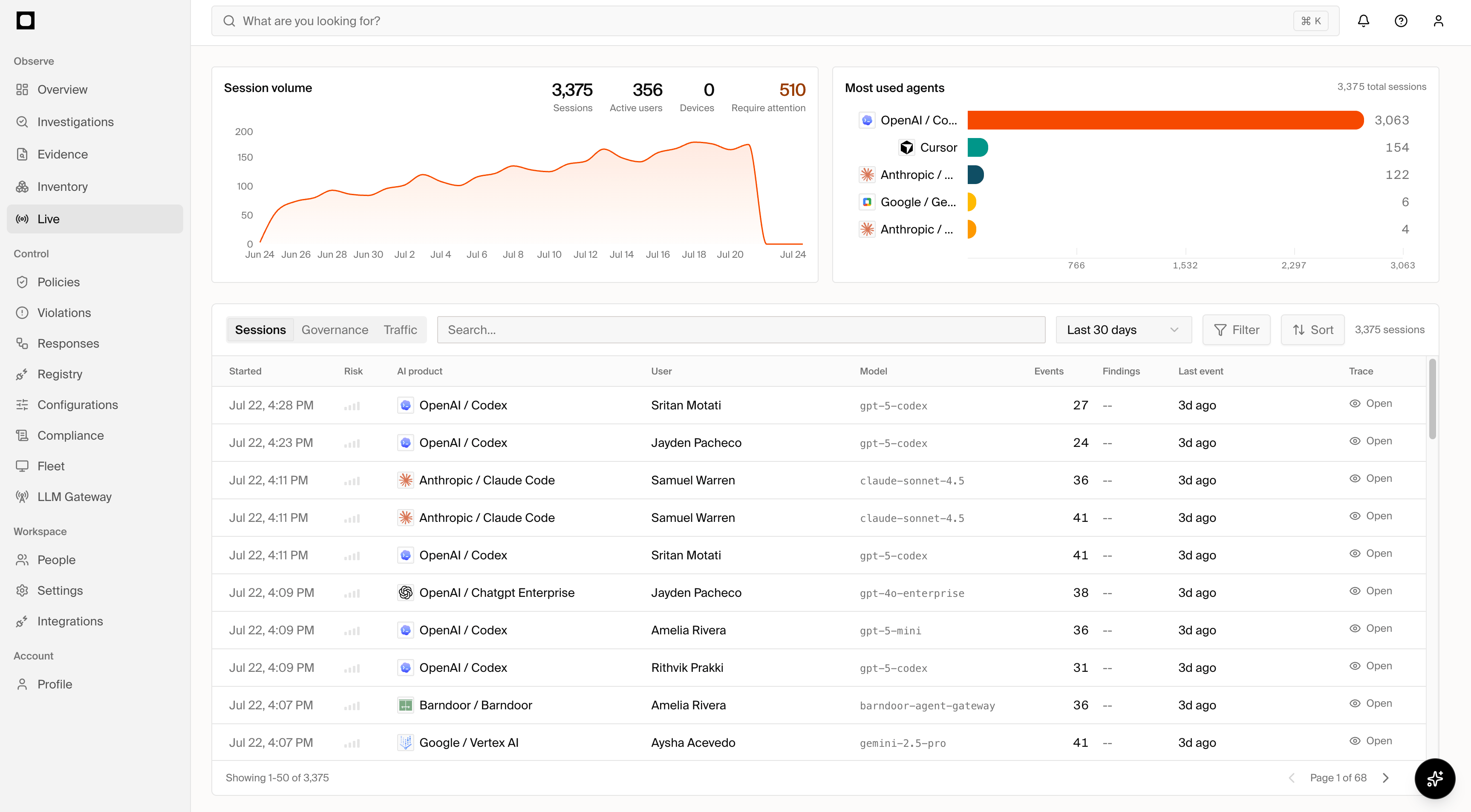
The Sessions page summarizes:
* Session volume over the selected time range.
* Total sessions, active users, devices, and sessions requiring attention.
* The most-used AI products and agents.
* Governance and traffic views derived from session activity.
The session table shows when a session started, its risk, AI product, user,
model, event count, linked findings, latest event, and whether a trace is
available. Search and filter the table to find activity by product, identity,
risk, status, or time period, then open a session for its complete context.
## Session detail
Each session has three complementary views:
| View | Use it to |
| --------- | ----------------------------------------------------------------------------------------- |
| Overview | Understand what happened, why it stands out, related findings, and recommended actions. |
| Telemetry | Inspect individual events and filter by event type, tool, policy result, or other detail. |
| Replay | Follow the retained conversation and events in chronological order. |
Replay reconstructs the session from evidence Forge retained; it does not
re-execute the session or collect a separate copy. Use its controls to move
through the conversation and tool lifecycle. Depending on the product and
integration, a replay can include:
* Prompt or model-input content.
* Model responses and token or model metadata.
* Tool names, inputs, results, and errors.
* Commands, files, repositories, URLs, and working directories.
* MCP servers and tools.
* Gateway routes and access profiles.
* Policy matches, actions, approvals, and scanner results.
## Follow related records
Forge presents the same activity through different views for different jobs:
| Record | Use it to |
| ---------------------------- | ------------------------------------------------------------------------------------------------------ |
| **Session** | Review the complete AI conversation or agent run in context. |
| **MCP Activity** | Operate and troubleshoot individual calls routed through MCP Gateway. |
| **Violation** | Review a policy occurrence, its decision, and enforcement evidence. |
| **Response** | Complete an approval or exception decision and inspect the resulting grant or session control. |
| **Finding or Investigation** | Understand a security issue that can combine activity, identities, and assets across multiple records. |
One event can therefore appear in a Session, contribute an MCP Activity row,
and link to a Violation or Response. These are linked views of the same
governed activity, not duplicate incidents. Use the links in each detail view
to move between the original activity and its governance or security context.
## Privacy and access
Sessions can include sensitive prompts, reasoning, file paths, commands, tool
inputs, and outputs. Forge shows only content that the connected source
provided and your organization's retention settings preserved. Content that
was unavailable or not retained cannot be reconstructed in Replay.
* Give broad operators access to summaries, status, and related records.
* Limit raw prompt, reasoning, tool input, and output access to reviewers who need it.
* Avoid copying sensitive session content into tickets or notes.
* Record whether evidence was redacted or summarized.
Use [JIT Viewing](/secure/jit-viewing) to require temporary approval before
sensitive Telemetry and Replay content is unlocked. Session metadata and
summary context remain available according to the viewer's permissions. Use
[Real-time Monitoring](/secure/real-time-monitoring) to review evolving session
risk and configure supported interventions.
Sessions group the events from an AI conversation or agent run into one
timeline. A session can include model requests, responses, tool calls, policy
decisions, files, routes, errors, and scanner results.
When a connected source provides them, Forge also tracks multi-agent and
subagent interactions within session activity.
Session detail depends on source capability and workspace privacy settings.
Fields that were not observed or retained are omitted.
## Sessions view
The Sessions page summarizes:
* Session volume over the selected time range.
* Total sessions, active users, devices, and sessions requiring attention.
* The most-used AI products and agents.
* Governance and traffic views derived from session activity.
The session table shows when a session started, its risk, AI product, user,
model, event count, linked findings, latest event, and whether a trace is
available. Search and filter the table to find activity by product, identity,
risk, status, or time period, then open a session for its complete context.
## Session detail
Each session has three complementary views:
| View | Use it to |
| --------- | ----------------------------------------------------------------------------------------- |
| Overview | Understand what happened, why it stands out, related findings, and recommended actions. |
| Telemetry | Inspect individual events and filter by event type, tool, policy result, or other detail. |
| Replay | Follow the retained conversation and events in chronological order. |
Replay reconstructs the session from evidence Forge retained; it does not
re-execute the session or collect a separate copy. Use its controls to move
through the conversation and tool lifecycle. Depending on the product and
integration, a replay can include:
* Prompt or model-input content.
* Model responses and token or model metadata.
* Tool names, inputs, results, and errors.
* Commands, files, repositories, URLs, and working directories.
* MCP servers and tools.
* Gateway routes and access profiles.
* Policy matches, actions, approvals, and scanner results.
## Follow related records
Forge presents the same activity through different views for different jobs:
| Record | Use it to |
| ---------------------------- | ------------------------------------------------------------------------------------------------------ |
| **Session** | Review the complete AI conversation or agent run in context. |
| **MCP Activity** | Operate and troubleshoot individual calls routed through MCP Gateway. |
| **Violation** | Review a policy occurrence, its decision, and enforcement evidence. |
| **Response** | Complete an approval or exception decision and inspect the resulting grant or session control. |
| **Finding or Investigation** | Understand a security issue that can combine activity, identities, and assets across multiple records. |
One event can therefore appear in a Session, contribute an MCP Activity row,
and link to a Violation or Response. These are linked views of the same
governed activity, not duplicate incidents. Use the links in each detail view
to move between the original activity and its governance or security context.
## Privacy and access
Sessions can include sensitive prompts, reasoning, file paths, commands, tool
inputs, and outputs. Forge shows only content that the connected source
provided and your organization's retention settings preserved. Content that
was unavailable or not retained cannot be reconstructed in Replay.
* Give broad operators access to summaries, status, and related records.
* Limit raw prompt, reasoning, tool input, and output access to reviewers who need it.
* Avoid copying sensitive session content into tickets or notes.
* Record whether evidence was redacted or summarized.
Use [JIT Viewing](/secure/jit-viewing) to require temporary approval before
sensitive Telemetry and Replay content is unlocked. Session metadata and
summary context remain available according to the viewer's permissions. Use
[Real-time Monitoring](/secure/real-time-monitoring) to review evolving session
risk and configure supported interventions.