> ## Documentation Index
> Fetch the complete documentation index at: https://docs.forge.ai/llms.txt
> Use this file to discover all available pages before exploring further.
# Configurations
> Define and deploy managed AI agent configurations across your organization.
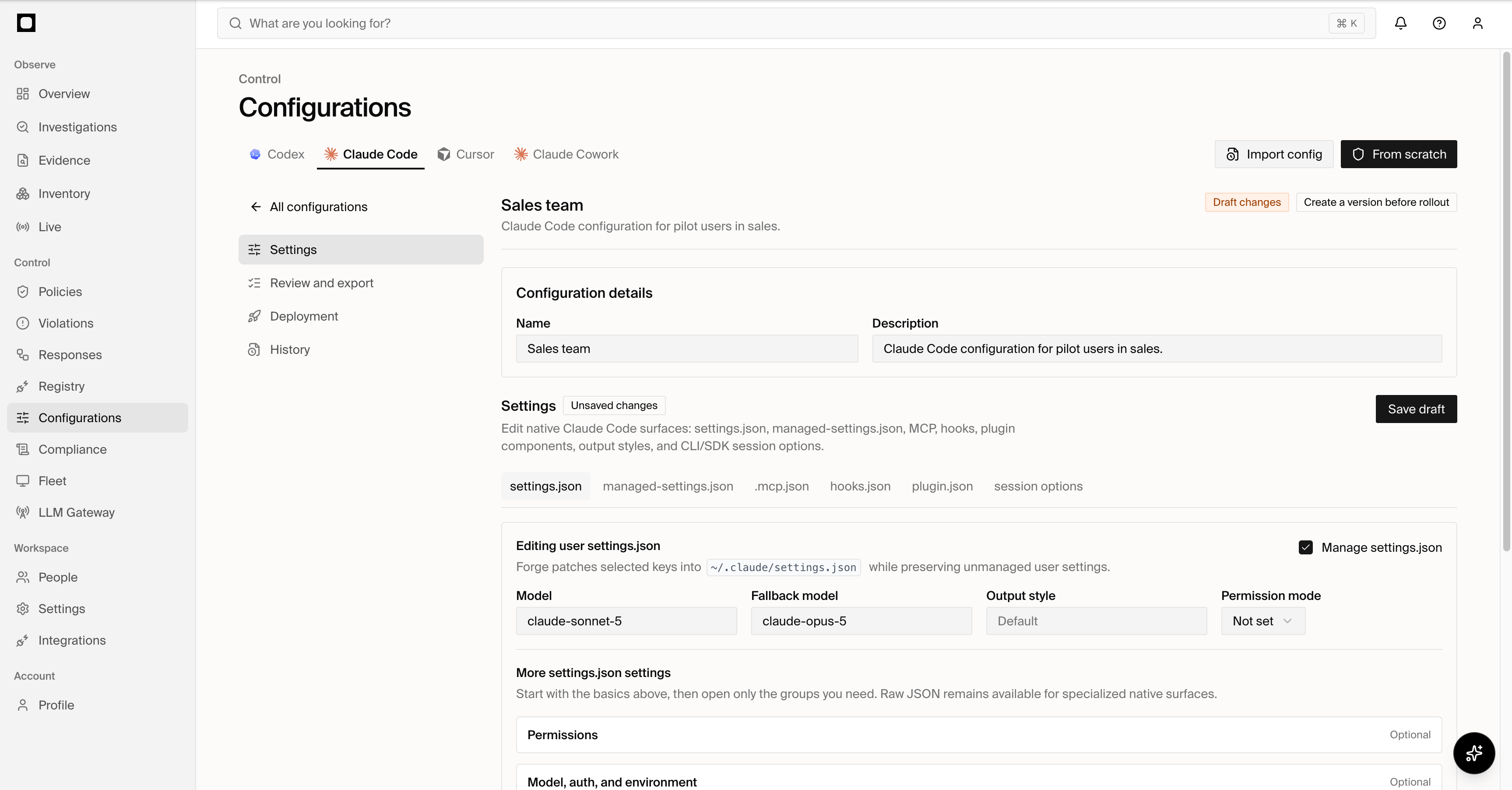
Configurations make it easy to define and roll out managed settings for AI
agents across your organization, with assignments based on user, group, and
agent. Forge gives security and platform teams one place to control approved
models, tools, permissions, MCP servers, plugins, and other supported agent
settings.
Forge can also suggest improvements to managed configurations based on the
real-world agent behavior it observes across your environment.
 ## How it works
| Object | Purpose |
| ----------- | ------------------------------------------------------------------------ |
| Profile | Defines the desired settings for one supported agent family |
| Assignment | Selects the users, groups, and agents that receive the profile |
| Release | Immutable published version of the profile |
| Deployment | Applies a release through a connected management or endpoint integration |
| Observation | Captures the configuration detected on an endpoint |
| Drift | Difference between the assigned release and observed configuration |
Profiles can be created in Forge or imported from an existing configuration.
Publishing compiles the profile into the native configuration format required
by the selected agent and deployment path.
## Supported agents
Forge provides managed configuration workspaces for:
* Codex
* Claude Code
* Cursor
* Claude Cowork
Each agent exposes its own configuration capabilities. Forge presents only the
settings and deployment methods supported by that agent family.
## Managed settings
Depending on the agent, a profile can manage:
| Area | Settings |
| ----------- | ----------------------------------------------------------------------------------------------- |
| Models | Default models, fallback behavior, and allowed model identifiers |
| Permissions | Tool allow and deny rules, approval behavior, and protected operations |
| MCP | Approved servers, server definitions, and agent-specific MCP controls |
| Extensions | Skills, plugins, subagents, commands, customer-configured hooks, and other supported extensions |
| Steering | Organization or project instructions, rules, agents, and output styles |
| Connection | Gateway, provider, credential-helper, and organization settings |
The available fields are determined by the selected agent and configuration
capability. Unsupported settings are not silently added to the generated
configuration.
Hooks shown in configuration or Inventory are native customer or product
artifacts. Forge does not install endpoint hooks for traffic enforcement.
## Deployment state
Forge retains the profile, assignment, release, deployment, and observed
endpoint state separately. This makes it possible to see:
* which release is assigned to each user, group, or agent;
* where that release has been deployed;
* the configuration currently observed on each endpoint;
* whether the endpoint matches the assigned release;
* deployment failures and configuration drift;
* the complete release and deployment history.
Published releases are immutable. Updating a profile creates a new release,
preserving the exact configuration previously deployed.
## Deploy Codex on Windows
Forge can publish managed Codex settings to Windows devices through Microsoft
Intune. Create or import a Codex profile, assign it to the intended users or
devices, review the generated Windows configuration, and publish the release.
Forge then follows the release from its Intune assignment through deployment
and endpoint readback.
The configuration view keeps each stage distinct: **Published** means the
release is ready, **Assigned** means the management platform has received the
targeting, **Deployed** means it reports a successful delivery, and **Observed**
means Forge has read the configuration from the endpoint. A device is in drift
when its observed settings do not match its assigned release.
When you update a profile, publish a new release and deploy it to the same
assignment. Forge preserves prior releases for review and rollback. Validation
errors identify the setting that cannot be rendered for Windows before the
release reaches devices; credentials and signing material are never shown in
the rendered configuration.
## How it works
| Object | Purpose |
| ----------- | ------------------------------------------------------------------------ |
| Profile | Defines the desired settings for one supported agent family |
| Assignment | Selects the users, groups, and agents that receive the profile |
| Release | Immutable published version of the profile |
| Deployment | Applies a release through a connected management or endpoint integration |
| Observation | Captures the configuration detected on an endpoint |
| Drift | Difference between the assigned release and observed configuration |
Profiles can be created in Forge or imported from an existing configuration.
Publishing compiles the profile into the native configuration format required
by the selected agent and deployment path.
## Supported agents
Forge provides managed configuration workspaces for:
* Codex
* Claude Code
* Cursor
* Claude Cowork
Each agent exposes its own configuration capabilities. Forge presents only the
settings and deployment methods supported by that agent family.
## Managed settings
Depending on the agent, a profile can manage:
| Area | Settings |
| ----------- | ----------------------------------------------------------------------------------------------- |
| Models | Default models, fallback behavior, and allowed model identifiers |
| Permissions | Tool allow and deny rules, approval behavior, and protected operations |
| MCP | Approved servers, server definitions, and agent-specific MCP controls |
| Extensions | Skills, plugins, subagents, commands, customer-configured hooks, and other supported extensions |
| Steering | Organization or project instructions, rules, agents, and output styles |
| Connection | Gateway, provider, credential-helper, and organization settings |
The available fields are determined by the selected agent and configuration
capability. Unsupported settings are not silently added to the generated
configuration.
Hooks shown in configuration or Inventory are native customer or product
artifacts. Forge does not install endpoint hooks for traffic enforcement.
## Deployment state
Forge retains the profile, assignment, release, deployment, and observed
endpoint state separately. This makes it possible to see:
* which release is assigned to each user, group, or agent;
* where that release has been deployed;
* the configuration currently observed on each endpoint;
* whether the endpoint matches the assigned release;
* deployment failures and configuration drift;
* the complete release and deployment history.
Published releases are immutable. Updating a profile creates a new release,
preserving the exact configuration previously deployed.
## Deploy Codex on Windows
Forge can publish managed Codex settings to Windows devices through Microsoft
Intune. Create or import a Codex profile, assign it to the intended users or
devices, review the generated Windows configuration, and publish the release.
Forge then follows the release from its Intune assignment through deployment
and endpoint readback.
The configuration view keeps each stage distinct: **Published** means the
release is ready, **Assigned** means the management platform has received the
targeting, **Deployed** means it reports a successful delivery, and **Observed**
means Forge has read the configuration from the endpoint. A device is in drift
when its observed settings do not match its assigned release.
When you update a profile, publish a new release and deploy it to the same
assignment. Forge preserves prior releases for review and rollback. Validation
errors identify the setting that cannot be rendered for Windows before the
release reaches devices; credentials and signing material are never shown in
the rendered configuration.