> ## Documentation Index
> Fetch the complete documentation index at: https://docs.forge.ai/llms.txt
> Use this file to discover all available pages before exploring further.
# LLM Gateway
> Control model access, routing, policy enforcement, usage, and spend through one governed endpoint.
Forge LLM Gateway provides a single governed endpoint for model traffic. It
centralizes authentication, identity attribution, model access, routing, policy
enforcement, budgets, and telemetry while preserving the request formats
applications already use.
 ## How it works
| Object | Purpose |
| --------------- | ------------------------------------------------------------------------------------------------------------ |
| Provider | Stores the upstream connection and credential mode. |
| Access profile | Defines the models, providers, data classes, policy checkpoints, and enforcement mode available to a caller. |
| Route | Maps a requested model and API surface to an upstream provider and model. |
| Gateway key | Authenticates one identity and assigns it to one access profile. |
| Service account | Represents a non-human app, agent, bot, or integration. |
| Budget | Applies spend and token limits to an access profile, key, or subject. |
A request authenticates with a gateway key. Forge resolves the key's identity
and access profile, validates the requested model and API surface, applies the
relevant policy and budget controls, selects an eligible route, and records the
result.
With a supported network integration or Forge for devices, Forge can
automatically route supported model traffic through the LLM Gateway. Teams get
one governed path without reconfiguring every application.
## Traffic entry
Traffic reaches the LLM Gateway through three supported paths:
| Path | Best for | Experience |
| -------------------- | ------------------------------------------------------------- | ----------------------------------------------------------------------------------------- |
| Network integration | Agentless coverage for traffic crossing the corporate network | Forge automatically routes supported model traffic through the LLM Gateway. |
| Forge for devices | Managed devices, including users working off-network | Forge automatically routes supported model traffic without per-application configuration. |
| Direct configuration | Applications and services with an explicit gateway connection | The application uses the Forge base URL and a gateway key. |
Network routing gives organizations agentless coverage from an existing
network control point. Forge for devices extends the same experience to
managed endpoints wherever they work. Direct configuration remains available
for teams that want to connect an application or service explicitly.
## Providers
Forge maintains a catalog of supported providers and the API surfaces available
for each one. Forge supports OpenAI, Anthropic, Azure OpenAI, Amazon Bedrock,
Vertex AI, Mistral, Cohere, xAI, Databricks, OpenRouter, and custom
OpenAI-compatible and Anthropic-compatible providers.
Provider credentials can use a Forge-managed secret reference, a
customer-managed credential, or no credential when the upstream connection
does not require one. Plaintext credentials are accepted only when a provider
is configured and are never returned by the API.
Forge reports each provider's configuration state and health separately.
Configuration states include `configured`, `disabled`, `error`, and `deleted`;
health can be `healthy`, `degraded`, `unhealthy`, `down`, or `unknown`.
## API surfaces
Routes are scoped to an API surface so a caller cannot use an upstream
capability merely because it can reach the provider.
| Family | Supported surfaces |
| -------------------- | ----------------------------------------------------------------------------------------------------------------------------------- |
| OpenAI-compatible | Chat Completions, Responses, Completions, Embeddings, Images, Audio, Models, Files, Batches, Fine-tuning, Moderations, and Realtime |
| Anthropic-compatible | Messages |
| Cloud providers | Bedrock Converse and Gemini Generate Content |
| Other | Rerank, provider passthrough, and custom surfaces |
The provider catalog is the source of truth for which surfaces a specific
provider supports.
When policy enforcement is enabled, OpenAI Responses requests must include the
complete provider-visible context in `input`. Forge rejects
`previous_response_id` continuations because the referenced provider-side
history cannot be evaluated or transformed by the gateway. Monitor and
simulate modes may observe these continuations without claiming full-context
enforcement.
## Access profiles
An access profile is the reusable control plane for a class of gateway traffic.
It defines what a caller assigned to the profile may request and what controls
Forge applies.
Access profiles configure:
* Model selectors and provider selectors.
* Data classes used by policy evaluation.
* Prompt, pre-tool-use, and post-tool-use policy checkpoints.
* Privacy mode for retained gateway data.
* Enforcement mode and lifecycle state.
| Setting | Values |
| ----------- | ------------------------------------------------ |
| State | `draft`, `active`, `disabled`, `archived` |
| Enforcement | `monitor`, `simulate`, `enforce`, `break_glass` |
| Checkpoint | `prompt`, `pre_tool_use`, `post_tool_use` |
| Privacy | `metadata_only`, `redacted_summary`, `hash_only` |
Profiles are versioned so changes to model access and enforcement can be
tracked. Identity assignment belongs to gateway keys: each key binds its
subject to one access profile.
## Routing
A route matches an access profile, requested model pattern, and API surface,
then directs the request to a provider. A route can preserve the requested
model name or rewrite it to a different upstream model.
| Setting | Purpose |
| ------------------- | ------------------------------------------------------------------- |
| Provider | Upstream destination for the request. |
| Model pattern | Requested model names eligible for the route. |
| Upstream model | Optional model name sent to the provider. |
| API surface | Protocol and operation exposed by the route. |
| Strategy | How Forge selects among eligible destinations in the same tier. |
| Priority and weight | Fallback-tier ordering and distribution controls. |
| Rollout state | Whether the route is being evaluated, enforced, paused, or retired. |
| Enforcement mode | Policy behavior applied on the route. |
| Policy checkpoints | Prompt and tool-use evaluation points. |
| Tool-deny behavior | Hard-block the call or return a rewritten refusal. |
### Tiers and strategies
Routes with the same priority form a tier. Forge tries lower priority numbers
first and moves to later tiers only when the earlier tiers have no eligible
destination or their attempts fail. Later tiers are therefore the fallback
path; `fallback` is not a strategy you select.
The strategy controls selection among eligible destinations within one tier:
| Strategy | Behavior |
| ---------- | -------------------------------------------------------------------------- |
| `fixed` | Use the tier's single matching destination. |
| `weighted` | Distribute traffic among destinations according to their configured share. |
| `policy` | Use deterministic policy ordering among eligible destinations. |
| `cost` | Prefer the eligible destination with the lowest configured estimated cost. |
| `latency` | Prefer the eligible destination with the best observed response latency. |
Forge excludes degraded or unhealthy destinations during their cooldown and
uses eligible destinations in the same tier before moving to the next tier. A
successful later probe restores a destination to healthy. Buffered request
surfaces can fail over before a response is returned; Forge does not replay a
stream after its response has begun.
Routes can also set same-destination retries, cooldown periods, and
provider-specific request overrides. Provider-owned and secret-bearing fields
cannot be supplied through request overrides.
Route rollout states are `draft`, `monitor`, `simulate`, `enforce`, `paused`,
and `archived`. Tool denials can use `hard_block` or `rewrite_refusal`.
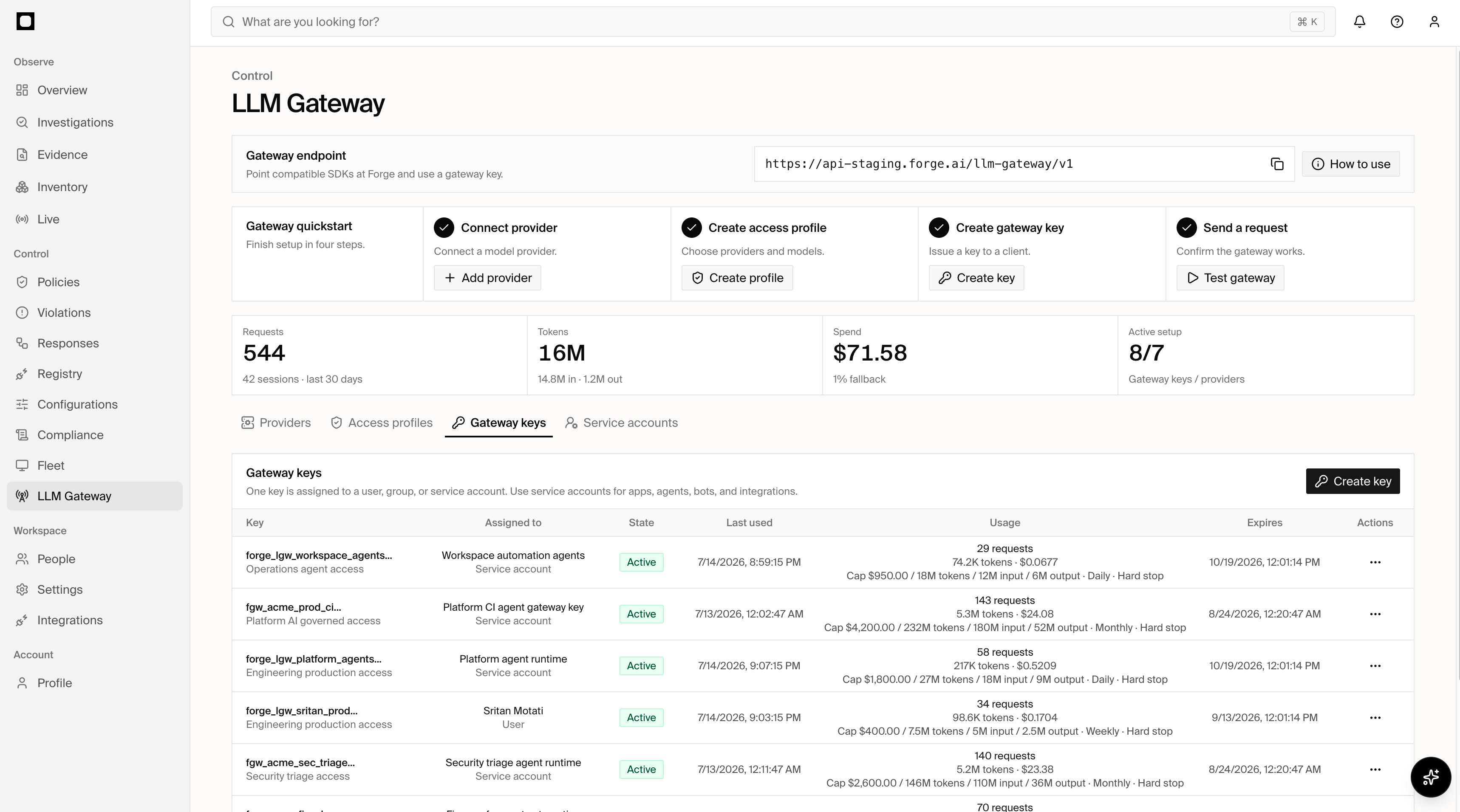
## Gateway keys
Gateway keys authenticate callers and connect each caller to an access profile.
A key binds one subject of type `user`, `group`, `app`, `agent`,
`service_account`, or `customer_tenant`.
Token classes include `personal`, `group`, `service_account`, `app`, `agent`,
`customer_tenant`, and `exchanged`. Keys can expire and can be rotated,
transferred, revoked, disabled, re-enabled, or deleted. Their runtime state is
`active`, `revoked`, or `expired`.
Forge displays a new gateway key's plaintext secret once. Store it in the
application's secret manager before leaving the creation flow.
## Service accounts
Service accounts give non-human workloads a durable identity rather than
sharing a person's key. They can represent applications, agents, bots, and
integrations.
A service account records its owner, environment, rotation policy, and state.
The owner can be a directory user, directory group, or app integration. States
are `active`, `disabled`, and `archived`.
## Budgets
Budgets can be attached to an access profile, gateway key, or subject. A budget
can enforce any combination of:
* Spend in USD.
* Input tokens.
* Output tokens.
* Total tokens.
Supported windows are `daily`, `weekly`, `monthly`, `rolling_24h`,
`rolling_7d`, and `rolling_30d`. Calendar windows reset in UTC; rolling windows
move continuously. When either a configured spend or token limit is reached,
Forge blocks subsequent requests in that budget window.
## Switch an app
Point the existing SDK at the Forge endpoint and replace the provider
credential with a scoped gateway key.
```typescript OpenAI theme={"system"}
import OpenAI from 'openai'
const client = new OpenAI({
apiKey: process.env.FORGE_LLM_GATEWAY_KEY,
baseURL: 'https://gateway.forge.example/llm-gateway/v1',
})
```
```typescript Anthropic theme={"system"}
import Anthropic from '@anthropic-ai/sdk'
const anthropic = new Anthropic({
apiKey: process.env.FORGE_LLM_GATEWAY_KEY,
baseURL: 'https://gateway.forge.example/llm-gateway/v1',
})
```
```typescript "Vercel AI SDK" theme={"system"}
import { createOpenAI } from '@ai-sdk/openai'
export const forgeOpenAI = createOpenAI({
apiKey: process.env.FORGE_LLM_GATEWAY_KEY,
baseURL: 'https://gateway.forge.example/llm-gateway/v1',
})
```
```typescript LangChain theme={"system"}
const model = new ChatOpenAI({
apiKey: process.env.FORGE_LLM_GATEWAY_KEY,
configuration: {
baseURL: 'https://gateway.forge.example/llm-gateway/v1',
},
})
```
```typescript LlamaIndex theme={"system"}
import { Settings } from 'llamaindex'
import { OpenAI } from '@llamaindex/openai'
Settings.llm = new OpenAI({
apiKey: process.env.FORGE_LLM_GATEWAY_KEY,
additionalSessionOptions: {
baseURL: 'https://gateway.forge.example/llm-gateway/v1',
},
})
```
```bash cURL theme={"system"}
curl https://gateway.forge.example/llm-gateway/v1/chat/completions \
-H "Authorization: Bearer $FORGE_LLM_GATEWAY_KEY" \
-H "Content-Type: application/json" \
-d '{"model":"gpt-4o-mini","messages":[{"role":"user","content":"hello"}]}'
```
Use the endpoint displayed in your Forge workspace in place of the example
hostname above.
### Session continuity
To group multiple model requests from one logical agent interaction, generate a
high-entropy session hint and send the same value unchanged on every request in
that interaction:
```bash theme={"system"}
-H "X-Forge-Session-Id: $YOUR_STABLE_SESSION_HINT"
```
Forge scopes the hint to the authenticated organization, access profile, key,
and subject before using it for telemetry. The `X-Forge-Session-Id` response
header contains Forge's canonical session ID for observability. Treat that
response value as read-only: continue sending your original hint rather than
using the returned canonical ID as the next request's hint.
### User attribution
The gateway key authenticates the application or service account. When the
application acts for an end user, it can also pass a verified identity token:
```bash theme={"system"}
-H "X-Forge-Identity-JWT: $CUSTOMER_IDP_JWT"
```
Forge validates the token's issuer, audience, signature, expiration, and mapped
claims before using it to attribute the request to a user.
## Policy checkpoints
Profiles and routes can invoke policies at three points:
| Checkpoint | Evaluation point |
| --------------- | --------------------------------------------------- |
| `prompt` | Before prompt content is sent upstream. |
| `pre_tool_use` | Before a requested tool executes. |
| `post_tool_use` | After tool execution, when its result is available. |
The profile and route enforcement modes determine whether a matching policy is
observed, simulated, enforced, or processed under break-glass behavior. Tool
denials can stop execution or return a rewritten refusal when that behavior is
configured on the route.
## Observability
Forge records the requested and served model, selected provider and route,
identity, policy outcomes, tokens, cost, latency, retries, fallbacks, errors,
cache hits, and denied tool calls for routed traffic.
Gateway analytics include:
* Request and session volume.
* Input, output, and total tokens.
* Provider-reported or Forge-estimated cost.
* Policy hits and denied tool calls.
* Route health, errors, retries, fallback rate, and cache hits.
* Bypass findings for observed traffic that did not use the gateway.
## How it works
| Object | Purpose |
| --------------- | ------------------------------------------------------------------------------------------------------------ |
| Provider | Stores the upstream connection and credential mode. |
| Access profile | Defines the models, providers, data classes, policy checkpoints, and enforcement mode available to a caller. |
| Route | Maps a requested model and API surface to an upstream provider and model. |
| Gateway key | Authenticates one identity and assigns it to one access profile. |
| Service account | Represents a non-human app, agent, bot, or integration. |
| Budget | Applies spend and token limits to an access profile, key, or subject. |
A request authenticates with a gateway key. Forge resolves the key's identity
and access profile, validates the requested model and API surface, applies the
relevant policy and budget controls, selects an eligible route, and records the
result.
With a supported network integration or Forge for devices, Forge can
automatically route supported model traffic through the LLM Gateway. Teams get
one governed path without reconfiguring every application.
## Traffic entry
Traffic reaches the LLM Gateway through three supported paths:
| Path | Best for | Experience |
| -------------------- | ------------------------------------------------------------- | ----------------------------------------------------------------------------------------- |
| Network integration | Agentless coverage for traffic crossing the corporate network | Forge automatically routes supported model traffic through the LLM Gateway. |
| Forge for devices | Managed devices, including users working off-network | Forge automatically routes supported model traffic without per-application configuration. |
| Direct configuration | Applications and services with an explicit gateway connection | The application uses the Forge base URL and a gateway key. |
Network routing gives organizations agentless coverage from an existing
network control point. Forge for devices extends the same experience to
managed endpoints wherever they work. Direct configuration remains available
for teams that want to connect an application or service explicitly.
## Providers
Forge maintains a catalog of supported providers and the API surfaces available
for each one. Forge supports OpenAI, Anthropic, Azure OpenAI, Amazon Bedrock,
Vertex AI, Mistral, Cohere, xAI, Databricks, OpenRouter, and custom
OpenAI-compatible and Anthropic-compatible providers.
Provider credentials can use a Forge-managed secret reference, a
customer-managed credential, or no credential when the upstream connection
does not require one. Plaintext credentials are accepted only when a provider
is configured and are never returned by the API.
Forge reports each provider's configuration state and health separately.
Configuration states include `configured`, `disabled`, `error`, and `deleted`;
health can be `healthy`, `degraded`, `unhealthy`, `down`, or `unknown`.
## API surfaces
Routes are scoped to an API surface so a caller cannot use an upstream
capability merely because it can reach the provider.
| Family | Supported surfaces |
| -------------------- | ----------------------------------------------------------------------------------------------------------------------------------- |
| OpenAI-compatible | Chat Completions, Responses, Completions, Embeddings, Images, Audio, Models, Files, Batches, Fine-tuning, Moderations, and Realtime |
| Anthropic-compatible | Messages |
| Cloud providers | Bedrock Converse and Gemini Generate Content |
| Other | Rerank, provider passthrough, and custom surfaces |
The provider catalog is the source of truth for which surfaces a specific
provider supports.
When policy enforcement is enabled, OpenAI Responses requests must include the
complete provider-visible context in `input`. Forge rejects
`previous_response_id` continuations because the referenced provider-side
history cannot be evaluated or transformed by the gateway. Monitor and
simulate modes may observe these continuations without claiming full-context
enforcement.
## Access profiles
An access profile is the reusable control plane for a class of gateway traffic.
It defines what a caller assigned to the profile may request and what controls
Forge applies.
Access profiles configure:
* Model selectors and provider selectors.
* Data classes used by policy evaluation.
* Prompt, pre-tool-use, and post-tool-use policy checkpoints.
* Privacy mode for retained gateway data.
* Enforcement mode and lifecycle state.
| Setting | Values |
| ----------- | ------------------------------------------------ |
| State | `draft`, `active`, `disabled`, `archived` |
| Enforcement | `monitor`, `simulate`, `enforce`, `break_glass` |
| Checkpoint | `prompt`, `pre_tool_use`, `post_tool_use` |
| Privacy | `metadata_only`, `redacted_summary`, `hash_only` |
Profiles are versioned so changes to model access and enforcement can be
tracked. Identity assignment belongs to gateway keys: each key binds its
subject to one access profile.
## Routing
A route matches an access profile, requested model pattern, and API surface,
then directs the request to a provider. A route can preserve the requested
model name or rewrite it to a different upstream model.
| Setting | Purpose |
| ------------------- | ------------------------------------------------------------------- |
| Provider | Upstream destination for the request. |
| Model pattern | Requested model names eligible for the route. |
| Upstream model | Optional model name sent to the provider. |
| API surface | Protocol and operation exposed by the route. |
| Strategy | How Forge selects among eligible destinations in the same tier. |
| Priority and weight | Fallback-tier ordering and distribution controls. |
| Rollout state | Whether the route is being evaluated, enforced, paused, or retired. |
| Enforcement mode | Policy behavior applied on the route. |
| Policy checkpoints | Prompt and tool-use evaluation points. |
| Tool-deny behavior | Hard-block the call or return a rewritten refusal. |
### Tiers and strategies
Routes with the same priority form a tier. Forge tries lower priority numbers
first and moves to later tiers only when the earlier tiers have no eligible
destination or their attempts fail. Later tiers are therefore the fallback
path; `fallback` is not a strategy you select.
The strategy controls selection among eligible destinations within one tier:
| Strategy | Behavior |
| ---------- | -------------------------------------------------------------------------- |
| `fixed` | Use the tier's single matching destination. |
| `weighted` | Distribute traffic among destinations according to their configured share. |
| `policy` | Use deterministic policy ordering among eligible destinations. |
| `cost` | Prefer the eligible destination with the lowest configured estimated cost. |
| `latency` | Prefer the eligible destination with the best observed response latency. |
Forge excludes degraded or unhealthy destinations during their cooldown and
uses eligible destinations in the same tier before moving to the next tier. A
successful later probe restores a destination to healthy. Buffered request
surfaces can fail over before a response is returned; Forge does not replay a
stream after its response has begun.
Routes can also set same-destination retries, cooldown periods, and
provider-specific request overrides. Provider-owned and secret-bearing fields
cannot be supplied through request overrides.
Route rollout states are `draft`, `monitor`, `simulate`, `enforce`, `paused`,
and `archived`. Tool denials can use `hard_block` or `rewrite_refusal`.
## Gateway keys
Gateway keys authenticate callers and connect each caller to an access profile.
A key binds one subject of type `user`, `group`, `app`, `agent`,
`service_account`, or `customer_tenant`.
Token classes include `personal`, `group`, `service_account`, `app`, `agent`,
`customer_tenant`, and `exchanged`. Keys can expire and can be rotated,
transferred, revoked, disabled, re-enabled, or deleted. Their runtime state is
`active`, `revoked`, or `expired`.
Forge displays a new gateway key's plaintext secret once. Store it in the
application's secret manager before leaving the creation flow.
## Service accounts
Service accounts give non-human workloads a durable identity rather than
sharing a person's key. They can represent applications, agents, bots, and
integrations.
A service account records its owner, environment, rotation policy, and state.
The owner can be a directory user, directory group, or app integration. States
are `active`, `disabled`, and `archived`.
## Budgets
Budgets can be attached to an access profile, gateway key, or subject. A budget
can enforce any combination of:
* Spend in USD.
* Input tokens.
* Output tokens.
* Total tokens.
Supported windows are `daily`, `weekly`, `monthly`, `rolling_24h`,
`rolling_7d`, and `rolling_30d`. Calendar windows reset in UTC; rolling windows
move continuously. When either a configured spend or token limit is reached,
Forge blocks subsequent requests in that budget window.
## Switch an app
Point the existing SDK at the Forge endpoint and replace the provider
credential with a scoped gateway key.
```typescript OpenAI theme={"system"}
import OpenAI from 'openai'
const client = new OpenAI({
apiKey: process.env.FORGE_LLM_GATEWAY_KEY,
baseURL: 'https://gateway.forge.example/llm-gateway/v1',
})
```
```typescript Anthropic theme={"system"}
import Anthropic from '@anthropic-ai/sdk'
const anthropic = new Anthropic({
apiKey: process.env.FORGE_LLM_GATEWAY_KEY,
baseURL: 'https://gateway.forge.example/llm-gateway/v1',
})
```
```typescript "Vercel AI SDK" theme={"system"}
import { createOpenAI } from '@ai-sdk/openai'
export const forgeOpenAI = createOpenAI({
apiKey: process.env.FORGE_LLM_GATEWAY_KEY,
baseURL: 'https://gateway.forge.example/llm-gateway/v1',
})
```
```typescript LangChain theme={"system"}
const model = new ChatOpenAI({
apiKey: process.env.FORGE_LLM_GATEWAY_KEY,
configuration: {
baseURL: 'https://gateway.forge.example/llm-gateway/v1',
},
})
```
```typescript LlamaIndex theme={"system"}
import { Settings } from 'llamaindex'
import { OpenAI } from '@llamaindex/openai'
Settings.llm = new OpenAI({
apiKey: process.env.FORGE_LLM_GATEWAY_KEY,
additionalSessionOptions: {
baseURL: 'https://gateway.forge.example/llm-gateway/v1',
},
})
```
```bash cURL theme={"system"}
curl https://gateway.forge.example/llm-gateway/v1/chat/completions \
-H "Authorization: Bearer $FORGE_LLM_GATEWAY_KEY" \
-H "Content-Type: application/json" \
-d '{"model":"gpt-4o-mini","messages":[{"role":"user","content":"hello"}]}'
```
Use the endpoint displayed in your Forge workspace in place of the example
hostname above.
### Session continuity
To group multiple model requests from one logical agent interaction, generate a
high-entropy session hint and send the same value unchanged on every request in
that interaction:
```bash theme={"system"}
-H "X-Forge-Session-Id: $YOUR_STABLE_SESSION_HINT"
```
Forge scopes the hint to the authenticated organization, access profile, key,
and subject before using it for telemetry. The `X-Forge-Session-Id` response
header contains Forge's canonical session ID for observability. Treat that
response value as read-only: continue sending your original hint rather than
using the returned canonical ID as the next request's hint.
### User attribution
The gateway key authenticates the application or service account. When the
application acts for an end user, it can also pass a verified identity token:
```bash theme={"system"}
-H "X-Forge-Identity-JWT: $CUSTOMER_IDP_JWT"
```
Forge validates the token's issuer, audience, signature, expiration, and mapped
claims before using it to attribute the request to a user.
## Policy checkpoints
Profiles and routes can invoke policies at three points:
| Checkpoint | Evaluation point |
| --------------- | --------------------------------------------------- |
| `prompt` | Before prompt content is sent upstream. |
| `pre_tool_use` | Before a requested tool executes. |
| `post_tool_use` | After tool execution, when its result is available. |
The profile and route enforcement modes determine whether a matching policy is
observed, simulated, enforced, or processed under break-glass behavior. Tool
denials can stop execution or return a rewritten refusal when that behavior is
configured on the route.
## Observability
Forge records the requested and served model, selected provider and route,
identity, policy outcomes, tokens, cost, latency, retries, fallbacks, errors,
cache hits, and denied tool calls for routed traffic.
Gateway analytics include:
* Request and session volume.
* Input, output, and total tokens.
* Provider-reported or Forge-estimated cost.
* Policy hits and denied tool calls.
* Route health, errors, retries, fallback rate, and cache hits.
* Bypass findings for observed traffic that did not use the gateway.