> ## Documentation Index
> Fetch the complete documentation index at: https://docs.forge.ai/llms.txt
> Use this file to discover all available pages before exploring further.
# MCP Gateway
> Control MCP discovery, authentication, tool access, policy enforcement, and audit through one governed endpoint.
 The MCP Gateway gives AI clients a governed connection to approved MCP servers.
Forge authenticates the caller, resolves their identity and upstream
credentials, removes disabled tools from discovery, applies Registry access
rules and the normal Forge Content policy engine to every tool call, and
records the complete decision path.
```mermaid theme={"system"}
flowchart LR
A["AI client"] --> B["Forge authentication"]
B --> C{"Registry ACLs"}
C -->|No grant or blocked| X["Deny and record"]
C -->|Allowed| D{"Content policies
The MCP Gateway gives AI clients a governed connection to approved MCP servers.
Forge authenticates the caller, resolves their identity and upstream
credentials, removes disabled tools from discovery, applies Registry access
rules and the normal Forge Content policy engine to every tool call, and
records the complete decision path.
```mermaid theme={"system"}
flowchart LR
A["AI client"] --> B["Forge authentication"]
B --> C{"Registry ACLs"}
C -->|No grant or blocked| X["Deny and record"]
C -->|Allowed| D{"Content policies
pre-tool"}
D -->|Block or approval| X
D -->|Allow or transform| E["Resolve upstream identity"]
E --> F["MCP server"]
F --> G{"Content policies
post-tool"}
G -->|Block| X
G -->|Allow, redact, filter, or guide| H["Return result"]
```
Registry access rules and organization-authored Content policies use the same
Forge policy engine. Registry rules establish who may use a server or tool;
Content policies inspect the identity, MCP server, tool, arguments, session
context, and result to control what happens inside an allowed call. Access
policies can separately govern use of the client, MCP product, or route at
connected endpoint and network enforcement surfaces.
## Architecture
| Component | Purpose |
| ----------------------- | ---------------------------------------------------------------------------------------- |
| Registry item | Durable identity, provenance, configuration, risk, and approval state for an MCP server. |
| Gateway endpoint | Organization-specific Streamable HTTP URL presented to MCP clients. |
| Upstream connection | Transport and URL Forge uses to reach the underlying MCP server. |
| Client authentication | OAuth or bearer-token authentication from the MCP client to Forge. |
| Upstream authentication | Organization, user, OAuth, or forwarded identity Forge presents to the server. |
| Access rule | Default-deny grant, approval requirement, or block for a server or selected tools. |
| Content policy | Pre-tool and post-tool inspection, transformation, approval, and enforcement. |
| Session | Actor-attributed record of tool discovery, calls, decisions, latency, and results. |
Each Registry item receives its own gateway URL:
```text theme={"system"}
https://mcp.forge.ai/organizations/{organizationId}/servers/{serverSlug}/mcp
```
The slug is permanent and is used by gateway URLs, policies, installations,
and audit records.
### Traffic entry
Forge can route supported MCP traffic through the gateway automatically, so
organizations can govern existing connections without reconfiguring every AI
client. Clients can also connect to the Forge gateway URL explicitly.
| Path | Best for | Experience |
| -------------------- | ------------------------------------------------------------- | ---------------------------------------------------------------------------------------- |
| Network integration | Agentless coverage for traffic crossing the corporate network | Forge automatically routes supported MCP connections through the organization's gateway. |
| Forge for devices | Managed devices, including users working off-network | Forge automatically routes supported MCP connections without per-client configuration. |
| Direct configuration | Clients with an explicit gateway connection | The client uses the Registry item's Forge gateway URL. |
In every case, Forge authenticates the caller and applies Registry and Content
policies before connecting to the approved server. Automatic routing preserves
the same access controls and audit trail as a directly configured client.
## Server sources
Servers reach the Registry through three paths:
| Source | Configuration |
| ---------- | -------------------------------------------------------------------------------------------------------------------- |
| Catalog | Vetted vendor-hosted or customer-instance server with predefined endpoint, authentication, risk, and setup metadata. |
| Discovered | MCP configuration observed on endpoints, in code, or through connected systems and promoted into the Registry. |
| Manual | Custom remote server defined with its URL, transport, authentication, and policy settings. |
Catalog entries distinguish vendor-operated remote servers from remote servers
hosted inside a customer's own SaaS or cloud instance. In every case, Forge
publishes the governed gateway endpoint; the upstream server remains at its
configured hosting location.
## Add a server
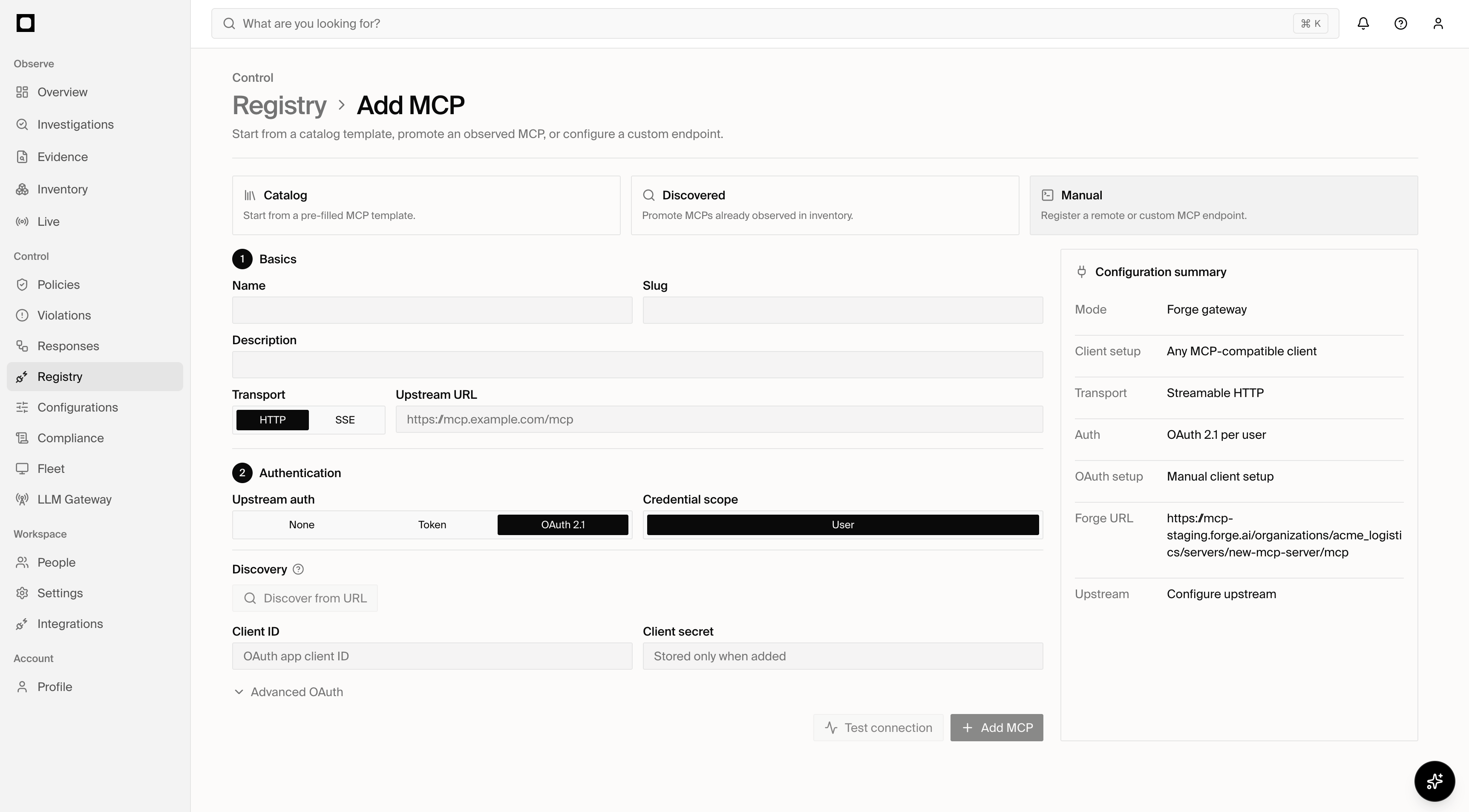
Administrators can open **Registry > Add MCP** and choose Catalog, Discovered,
or Manual. People who cannot manage the Registry see **Request MCP** instead.
For a manual remote server:
1. Enter the upstream MCP URL and select Streamable HTTP or SSE.
2. Configure how Forge connects upstream. You can apply an optional connection
template or edit the fields directly:
* **No authentication** for a public server such as DeepWiki.
* **Shared bearer token** or **Shared custom header** when Forge should send
one organization credential.
* **Per-user OAuth** when every person must connect their provider account.
* **Forward Forge identity** when a trusted upstream accepts Forge identity
headers or a signed identity assertion.
3. Select **Add MCP**. Forge creates a server-wide allow rule for the
administrator who added the server when their directory identity is linked.
4. Forge opens the new server and attempts to synchronize tools, resources,
resource templates, and prompts whenever the upstream is immediately usable.
5. In **Settings**, use **Save and test** after changing the connection. A
successful test also synchronizes capabilities.
MCPs selected from **Discovered** open the same review form before creation.
Forge maps observed no-auth, token, and OAuth configurations to reachable
settings. After the administrator confirms **Add MCP**, the server uses
the same creator-access and setup destination as Catalog and Manual creation.
Upstream authentication does not control access to the hosted Forge URL.
Interactive clients sign in to Forge so Registry policy and audit retain the
caller's identity. Service/API tokens are a separate automation option.
If automatic capability synchronization fails, the server and any successful
OAuth connection remain intact. Open **Capabilities** to retry the sync. A
catalog comparison distinguishes a server that has never synchronized, a
failed sync, and live tools that differ from the vetted catalog baseline.
## Transports
The client-facing Forge endpoint uses Streamable HTTP. Forge supports these
upstream and compatibility paths:
| Path | Behavior |
| --------------- | --------------------------------------------------------------------------------------------------------- |
| Streamable HTTP | Preferred remote upstream transport. Supports POST requests and resumable session operations. |
| SSE | Proxies legacy remote MCP servers that expose the HTTP+SSE transport. |
| Local stdio | Uses the Forge CLI or a managed local bridge for clients or servers that cannot connect over hosted HTTP. |
An active hosted gateway endpoint requires a remote Streamable HTTP or SSE
upstream URL. A stdio server is represented in the Registry and delivered
through the local bridge; Forge does not execute its process inside the hosted
gateway.
## Client authentication
Client authentication protects the Forge-facing endpoint independently of the
credential used for the upstream server.
### OAuth 2.1
Interactive MCP clients connect with Forge OAuth 2.1. Forge publishes OAuth
authorization-server and protected-resource metadata for discovery, uses a
dedicated MCP audience, and supports authorization-code exchange with PKCE,
refresh, revocation, and dynamic client registration.
The grant must include `mcp:connect` and any scopes required by the requested
surface. The authenticated organization must match the organization in the
gateway URL.
REST API access tokens use a different audience and cannot be reused as MCP
OAuth tokens.
### Service tokens
Non-interactive clients can send an approved service-account bearer token when
automation tokens are enabled for the endpoint. The token must include
`mcp:connect`, belong to the same organization and server installation, and
carry the scopes required for the call.
Use user OAuth for interactive assistants when individual attribution matters.
Use service accounts for unattended apps, agents, and automation.
## Upstream authentication
After local authorization succeeds, Forge resolves the credential presented to
the upstream MCP server.
| Mode | Scope | Upstream behavior |
| ---------------- | -------------------- | ----------------------------------------------------------------------------------------- |
| None | None | Sends no upstream credential. |
| Admin static | Organization | Uses one managed organization credential for every permitted caller. |
| Per-user static | User | Uses the credential stored for the individual Registry installation. |
| OAuth 2.1 | Organization or user | Uses the configured OAuth client and the applicable organization or delegated user grant. |
| Identity headers | Organization or user | Sends verified Forge actor attributes in `X-Forge-*` headers. |
| Signed identity | Organization or user | Sends a short-lived signed identity assertion in `X-Forge-Identity-JWT`. |
For HTTP upstreams, static and OAuth access tokens can be placed in the
`Authorization` header or a configured custom header. Environment-variable
placement is reserved for local stdio execution and is not supported by the
hosted HTTP proxy.
Forge strips inbound `X-Forge-*` identity headers before constructing trusted
identity forwarding. Clients therefore cannot supply or override the upstream
Forge identity.
### Secret handling
Organization credentials and OAuth client secrets are stored as managed Forge
secret references. The gateway resolves them only after rate limits, capability
state, Registry ACLs, and pre-tool policies permit the request. Secret values
are not included in policy inputs or denial evidence.
## OAuth configuration
Forge can discover an upstream server's OAuth metadata or use explicit
configuration.
| Setting | Purpose |
| --------------------------- | ------------------------------------------------------------------------- |
| Authorization endpoint | Starts the upstream authorization-code flow. |
| Token endpoint | Exchanges codes and refreshes access tokens. |
| Revocation endpoint | Revokes upstream access or refresh tokens when available. |
| Registration endpoint | Registers the Forge gateway through OAuth Dynamic Client Registration. |
| Client ID metadata document | Supplies client metadata through CIMD when supported. |
| Client ID and secret | Uses a customer-owned OAuth application instead of a managed integration. |
| Resource | Sets the protected-resource indicator or expected upstream audience. |
| Scopes | Limits the permissions requested from the upstream provider. |
| Token endpoint auth | `none`, `client_secret_basic`, or `client_secret_post`. |
Forge supports PKCE with `S256`. A server can use a Forge-managed OAuth client
when one is available, a customer-owned client, Dynamic Client Registration, or
a Client ID Metadata Document. Callback rules restrict which redirect URIs can
be used by MCP clients.
### Client callback policy
Client callback rules apply to applications connecting to Forge. They do not
configure the callback URL registered with an upstream provider.
The callback policy is available for every hosted Registry MCP, including
public upstreams with no upstream authentication, because interactive clients
still authenticate to Forge.
* With no client callback rules, Forge accepts valid HTTPS callbacks and
permitted loopback callbacks.
* Adding the first rule switches the organization to explicit-policy mode:
callbacks must match an Allow rule, and Block rules take precedence.
* The organization's Forge callback is always trusted.
* A rejected authorization response includes the exact callback URI. Copy that
value into **Settings > Client callback policy** when the client is trusted;
prefer an exact URL over a wildcard.
For example, a Cloudflare playground client may use a callback under
`https://playground.ai.cloudflare.com/`. Configure that callback only when
explicit rules already restrict the organization and the playground is an
approved client.
User-scoped OAuth connections are stored per Registry installation. Forge
refreshes eligible grants and marks a connection for reconnection when its
refresh path can no longer produce a valid access token.
## Access controls
Registry access is blocked by default. An enabled rule must grant the actor
access before Forge invokes a tool.
| Dimension | Values |
| --------- | -------------------------------------------- |
| Subject | Everyone, selected users, or selected groups |
| Surface | Entire server or selected tool names |
| Decision | Allow, require approval, or block |
| State | Active, disabled, or deleted |
Server-wide rules apply to every tool. Tool-scoped rules use the stable tool
identities discovered from `tools/list`. Forge combines all matching Registry
rules through normal Content-policy precedence; an allow does not bypass a
stronger matching approval or block.
Forge also uses this effective tool-level access when determining whether one
identity can reach every exact tool named in a cross-server investigation
occurrence.
Registry rules are compiled into policy projections and remain visible with
their source, revision, description, rationale, and scope. Organization-authored
MCP ACLs can coexist with Registry-owned rules.
### Tool visibility
Forge removes tools disabled in the Registry from `tools/list`. Registry ACLs
and Content policies are then enforced again on every `tools/call`; receiving a
tool definition from the upstream server does not grant permission to invoke
it. Naming a disabled or unauthorized tool directly does not bypass
authorization.
## Content policies
MCP Gateway calls participate in the same Content policy engine used across
other Forge enforcement surfaces.
### Pre-tool
Before `tools/call` reaches the upstream server, policies can evaluate:
* User, group, and service-account identity.
* MCP server and stable tool identity.
* Tool name and structured arguments.
* Agent, product, and session context available to the gateway.
Compatible actions include allow, block, review, approval, nudge, and input
redaction. Approval grants are bound to the matching policy revision and
subject. Redaction rewrites the structured tool arguments before Forge resolves
the upstream credential and sends the request.
### Post-tool
After a successful upstream call, policies can inspect the tool result before
it returns to the client. Compatible actions can:
* Block the result.
* Redact the complete result or selected structured paths.
* Filter objects from a structured collection.
* Flag the event for review.
* Attach policy guidance for the next supported model step.
See [Policies](/secure/overview), [Actions](/secure/actions), and
[Redaction](/secure/redaction) for the complete policy schema and action
constraints.
## Request limits
Gateway endpoints can enforce request limits within a configurable window.
Limits can apply independently to:
| Limit | Scope |
| ------------------ | ------------------------------------ |
| Server requests | All requests to the Registry server. |
| User requests | Requests by one authenticated actor. |
| Tool requests | Calls to one tool across actors. |
| Tool-user requests | Calls to one tool by one actor. |
Individual tools can override the endpoint's default tool and per-user tool
limits. Forge returns `429` and records the limiting scope, configured limit,
observed count, and window when a request is rejected.
## Tool inventory
Forge refreshes the server's MCP surfaces and records each tool's name,
description, input schema, content digest, discovery state, and first and last
observation. Changes are separated into added, changed, unchanged, and removed
tools.
Tool definitions can be evaluated for:
* Read, write, administrative, and destructive capability.
* Package and source provenance.
* Schema or description changes.
* Deterministic and semantic risk findings.
Administrators can disable an individual tool without removing the whole
server. Disabled tools are removed from discovery and rejected at invocation.
## Evaluation order
For each `tools/call`, Forge evaluates:
1. The client credential, organization, `mcp:connect` capability, endpoint
state, and server binding.
2. The active transport, session, and configured request limits.
3. Whether the tool is disabled and whether a stable identity is available for
tool-scoped rules.
4. Registry-owned and organization-authored MCP access rules.
5. Pre-tool Content policies and any required approval grant.
6. Upstream credential or trusted identity forwarding.
7. The upstream MCP request.
8. Post-tool Content policies and result transformations.
9. Session, governance decision, policy hit, latency, and audit persistence.
The upstream credential is not resolved and the upstream server is not called
when a local gate denies the request.
## Sessions
MCP Gateway sessions preserve actor and endpoint boundaries. A session cannot
be resumed by another actor or used against a different Registry server.
Streamable HTTP clients can create, resume, and delete sessions through the
gateway endpoint.
Each call records the actor, server, tool, outcome, policy or access-rule
evidence, HTTP status, latency, and session relationship. Forge distinguishes
allowed, denied, approval-required, rate-limited, authentication, credential,
transport, configuration, and upstream-error outcomes.
Applications using both Forge LLM Gateway and MCP Gateway can attach the exact
parent model tool-call identifiers. This correlation links the MCP invocation
to its originating model session but never grants access or changes a policy
decision.
See [MCP](/developer/mcp) for client configuration, OAuth connection examples,
local bridge commands, and correlation headers.