> ## Documentation Index
> Fetch the complete documentation index at: https://docs.forge.ai/llms.txt
> Use this file to discover all available pages before exploring further.
# Overview
> Enforce consistent access and content controls across every connected AI surface.
Forge policies define what people and agents can access, what data and actions
are allowed inside AI workflows, and what happens when a rule matches. Policies
are evaluated across routed endpoints, networks, providers, and Forge gateways
so the same control follows activity across your AI estate.
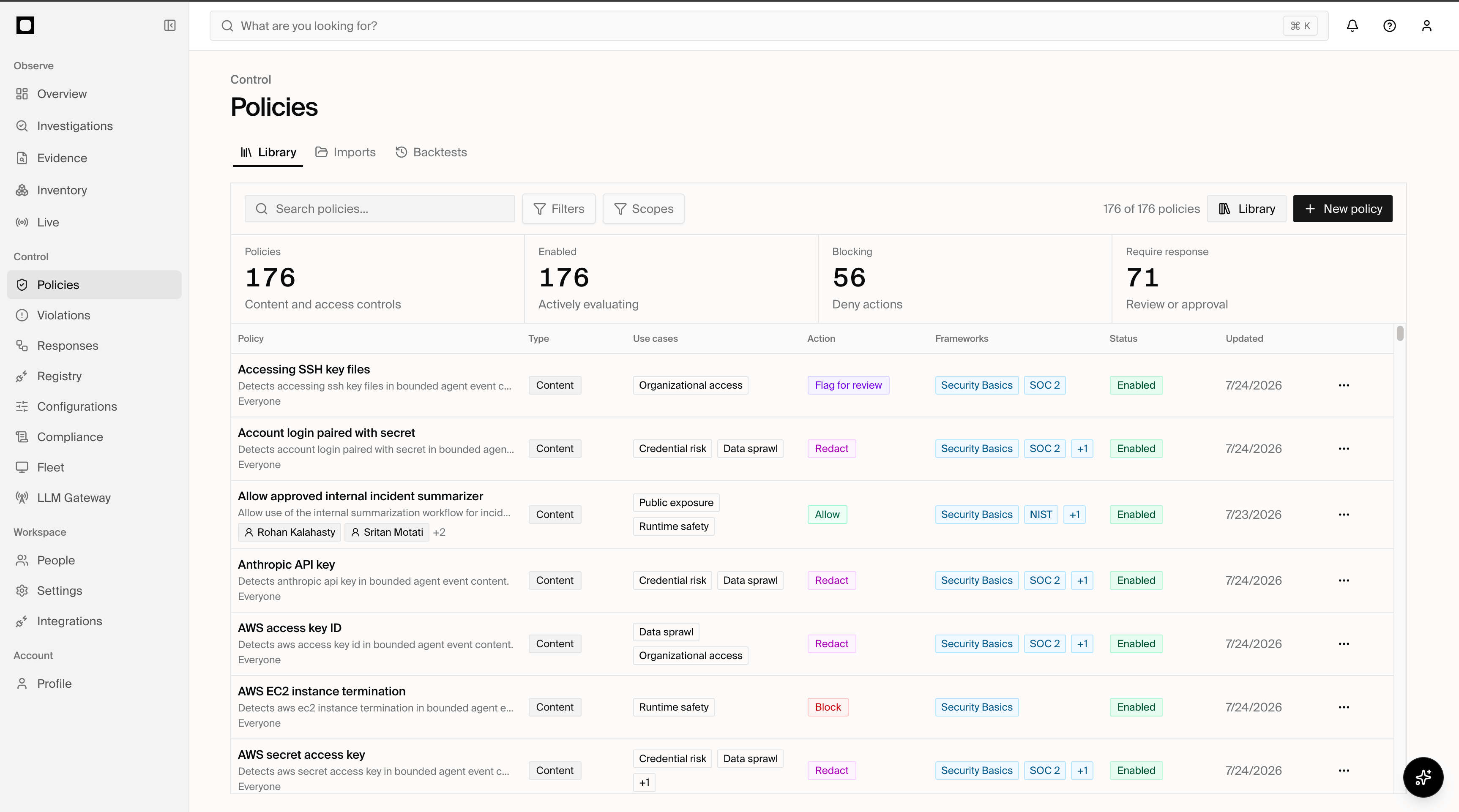 ## Policy types
Forge has two organization-authored policy types:
| Type | Governs | Examples |
| ------- | ----------------------------------------------------------------------- | --------------------------------------------------------------------------------------------- |
| Content | What enters, leaves, or happens within an AI or agent interaction | Inspect prompts, constrain tool calls, redact sensitive values, filter results, block output |
| Access | Whether an AI product, provider, route, process, or account can be used | Block unapproved AI destinations, require SSO, govern local models, contain detected software |
### Content policies
Content policies evaluate the data and actions inside an AI workflow at one or
more checkpoints:
| Checkpoint | Evaluation time | Typical controls |
| ----------- | ---------------------------------------------- | ------------------------------------------------------ |
| `prompt` | Before a prompt continues | Detect, guide, redact, review, or block submitted text |
| `pre_tool` | Before an agent tool executes | Allow, block, guide, or require approval |
| `post_tool` | After a tool returns | Inspect, redact, or filter tool results |
| `response` | When a supported surface provides model output | Inspect or govern response content |
Content policies can use identity, agent, product, model, MCP, classification,
tool input, tool result, and response context when the enforcing surface
provides it.
The `response` checkpoint depends on the routed API surface and its response
adapter.
### Access policies
Access policies govern the routes and software through which AI is reached.
They can evaluate:
* AI products and providers
* destinations and network routes
* processes and local runtimes
* browsers, extensions, and account posture
* users, groups, and devices
* source health and available enforcement capabilities
Access decisions can run through an endpoint route or a provider-native network
integration. A policy may also authorize a specific remediation, such as
terminating a process, clearing site data, disabling an extension, or repairing
a managed configuration.
## Policy anatomy
Every policy contains:
1. A durable `id`, display metadata, and enabled state.
2. A typed scope defining the identities and assets to which it applies.
3. Native conditions or bounded Rego match logic.
4. An optional exception tree that suppresses an otherwise valid match.
5. A typed action such as `block`, `redact`, or `require_approval`.
6. Family-specific configuration for evaluation points, transformations,
approvals, runtime detection, notifications, or remediation.
Forge records every matching policy and its immutable revision. When multiple
policies match, all hits remain visible and the strongest compatible action
determines the final outcome.
```mermaid theme={"system"}
flowchart LR
A["AI activity"] --> B["Connected control point"]
B --> C{"Access policies"}
C -->|Permitted route| D{"Content policies"}
C -->|Denied route| G["Block or remediate"]
D --> E["Allow, guide, review, or approve"]
D --> F["Redact, filter, or block"]
```
## Enforcement
Policy behavior depends on the capabilities of the surface evaluating it. A
routed endpoint, network control, or gateway can stop a pending action; an
observe-only source can record the same match but cannot retroactively prevent
completed activity. Forge validates family, checkpoint, action, and remediation
compatibility when the policy is saved.
Create, test, and verify Content and Access policies in the Console.
Policy objects, scope, evaluation surfaces, and shared fields.
Fields, operators, boolean logic, exceptions, and session history.
Exact outcomes, checkpoint constraints, defaults, and precedence.
Redaction strategies, structured paths, and result filtering.
Access-policy runtime behavior, surfaces, phases, and response actions.
Policy-as-code inputs, outputs, language limits, and validation.
Complete Content and Access policy definitions.
Revisions, ownership, backtests, deletion, and audit history.
## Policy types
Forge has two organization-authored policy types:
| Type | Governs | Examples |
| ------- | ----------------------------------------------------------------------- | --------------------------------------------------------------------------------------------- |
| Content | What enters, leaves, or happens within an AI or agent interaction | Inspect prompts, constrain tool calls, redact sensitive values, filter results, block output |
| Access | Whether an AI product, provider, route, process, or account can be used | Block unapproved AI destinations, require SSO, govern local models, contain detected software |
### Content policies
Content policies evaluate the data and actions inside an AI workflow at one or
more checkpoints:
| Checkpoint | Evaluation time | Typical controls |
| ----------- | ---------------------------------------------- | ------------------------------------------------------ |
| `prompt` | Before a prompt continues | Detect, guide, redact, review, or block submitted text |
| `pre_tool` | Before an agent tool executes | Allow, block, guide, or require approval |
| `post_tool` | After a tool returns | Inspect, redact, or filter tool results |
| `response` | When a supported surface provides model output | Inspect or govern response content |
Content policies can use identity, agent, product, model, MCP, classification,
tool input, tool result, and response context when the enforcing surface
provides it.
The `response` checkpoint depends on the routed API surface and its response
adapter.
### Access policies
Access policies govern the routes and software through which AI is reached.
They can evaluate:
* AI products and providers
* destinations and network routes
* processes and local runtimes
* browsers, extensions, and account posture
* users, groups, and devices
* source health and available enforcement capabilities
Access decisions can run through an endpoint route or a provider-native network
integration. A policy may also authorize a specific remediation, such as
terminating a process, clearing site data, disabling an extension, or repairing
a managed configuration.
## Policy anatomy
Every policy contains:
1. A durable `id`, display metadata, and enabled state.
2. A typed scope defining the identities and assets to which it applies.
3. Native conditions or bounded Rego match logic.
4. An optional exception tree that suppresses an otherwise valid match.
5. A typed action such as `block`, `redact`, or `require_approval`.
6. Family-specific configuration for evaluation points, transformations,
approvals, runtime detection, notifications, or remediation.
Forge records every matching policy and its immutable revision. When multiple
policies match, all hits remain visible and the strongest compatible action
determines the final outcome.
```mermaid theme={"system"}
flowchart LR
A["AI activity"] --> B["Connected control point"]
B --> C{"Access policies"}
C -->|Permitted route| D{"Content policies"}
C -->|Denied route| G["Block or remediate"]
D --> E["Allow, guide, review, or approve"]
D --> F["Redact, filter, or block"]
```
## Enforcement
Policy behavior depends on the capabilities of the surface evaluating it. A
routed endpoint, network control, or gateway can stop a pending action; an
observe-only source can record the same match but cannot retroactively prevent
completed activity. Forge validates family, checkpoint, action, and remediation
compatibility when the policy is saved.
Create, test, and verify Content and Access policies in the Console.
Policy objects, scope, evaluation surfaces, and shared fields.
Fields, operators, boolean logic, exceptions, and session history.
Exact outcomes, checkpoint constraints, defaults, and precedence.
Redaction strategies, structured paths, and result filtering.
Access-policy runtime behavior, surfaces, phases, and response actions.
Policy-as-code inputs, outputs, language limits, and validation.
Complete Content and Access policy definitions.
Revisions, ownership, backtests, deletion, and audit history.