

Gateway
How it works
A request authenticates with a gateway key or a supported client’s organization
sign-in. Forge resolves the caller’s identity and access profile, validates the requested model and API surface, applies the
relevant policy and budget controls, selects an eligible route, and records the
result.
With a supported network integration or Forge for devices, Forge can
automatically route supported model API traffic through the LLM Gateway. Teams
get one governed path without reconfiguring every application.
Traffic entry
Traffic reaches the LLM Gateway through three supported paths:
Native web and desktop sessions use a separate inspection path that preserves
the provider login. Routing those sessions does not switch them to a managed
model provider or apply an explicit gateway access profile. See
Architecture for the two paths.
Network routing gives organizations agentless coverage from an existing
network control point. Forge for devices extends the same experience to
managed endpoints wherever they work. Direct configuration remains available
for teams that want to connect an application or service explicitly.
Providers
Forge maintains a catalog of supported providers and the API surfaces available for each one. The provider picker includes OpenAI, Anthropic, Azure OpenAI, Microsoft Foundry Models, Amazon Bedrock, Amazon Bedrock Mantle, Vertex AI, Gemini, Mistral, Cohere, xAI, Databricks, OpenRouter, Cerebras, DeepSeek, Fireworks AI, Groq, Nebius AI Studio, Perplexity, Forge Router, and custom OpenAI-compatible and Anthropic-compatible connections. Microsoft Foundry Models and Bedrock Mantle accept a configured regional base URL and provider API key for Chat Completions and Responses, including streams. For Bedrock Mantle, expand Advanced authentication to use AWS access keys instead. Enter the access key ID, secret access key, region, and any session token. Forge stores them securely and signs requests for the selected region. These are separate connections from Azure OpenAI and Bedrock Converse. Provider credentials can use a Forge-managed secret reference, a customer-managed credential, or no credential when the upstream connection does not require one. Plaintext credentials are accepted only when a provider is configured and are never returned by the API. Forge reports each provider’s configuration state and health separately. Configuration states includeconfigured, disabled, error, and deleted;
health can be healthy, degraded, unhealthy, down, or unknown.
The provider and model picker uses a versioned Forge catalog. It shows models
eligible for the selected provider and still accepts a custom model ID when
your provider offers a model that is not yet listed. Forge reviews model
capabilities and prices before publishing catalog changes. The Terraform
catalog data source exposes model entries and a digest so plans can detect a
catalog update without pinning a model list in configuration.
API surfaces
Routes are scoped to an API surface so a caller cannot use an upstream capability merely because it can reach the provider.
The provider catalog is the source of truth for which surfaces a specific
provider supports.
For configured OpenAI-compatible destinations, native media routes include
image generation, edits, and variations; audio speech, transcription, and
translation; and video creation, status, and content download. Forge applies
access, routing, and budget controls to these routes and passes the media
content through without content inspection. Video downloads stream to the
caller and are limited to 1 GiB.
On native Anthropic Messages routes, Forge forwards syntactically valid
Anthropic-Beta feature headers and preserves output_config.effort in the
request body. Forge replaces caller credential headers with the credential
assigned to the selected provider. Provider beta features still require that
the selected Anthropic model supports them.
OpenAI Chat Completions can also use an Anthropic provider through Forge’s
Chat-to-Messages bridge. That bridge currently supports text turns and
function-tool history, including streaming and provider-reported usage. It
uses a 4096 output-token limit if max_tokens is omitted and rejects
unsupported request fields or provider blocks before releasing a translated
response. OpenAI Responses calls can use the same Anthropic Messages route
for text and function calls in unary or streaming mode. The bridge returns provider-
reported token usage and rejects unsupported input before contacting Anthropic.
Anthropic Messages calls can also use an OpenAI Chat route for text and
function calls in unary or streaming mode. Forge translates the Chat response
and provider usage back to the Messages format.
Gemini, Vertex and Bedrock Converse routes can serve Chat, Responses,
Messages, GenerateContent and Converse clients. The bridges accept a documented
text and function-tool subset, reject unsupported fields, and use provider-
reported usage when available. GenerateContent requests to OpenAI Chat or
Anthropic Messages routes support text turns, system instructions and common
generation settings in unary mode. Tool, multimodal and thought fields that
cannot be preserved are rejected before a provider call. The gateway returns
an error if the chosen provider operation cannot support a streaming request.
When policy enforcement is enabled, OpenAI Responses requests must include the
complete provider-visible context in
input. Forge rejects
previous_response_id continuations because the referenced provider-side
history cannot be evaluated or transformed by the gateway. Monitor and
simulate modes may observe these continuations without claiming full-context
enforcement.Access profiles
An access profile is the reusable control plane for a class of gateway traffic. It defines what a caller assigned to the profile may request and what controls Forge applies. Access profiles configure:- Model selectors and provider selectors.
- Data classes used by policy evaluation.
- Prompt, pre-tool-use, and post-tool-use policy checkpoints.
- Privacy mode for retained gateway data.
- Enforcement mode and lifecycle state.
Profiles are versioned so changes to model access and enforcement can be
tracked. A gateway key binds its subject to one profile. Organization sign-in
uses the person’s effective managed-access assignment, including department
and organization-default assignments.
Connect an app
In Gateway, select Connect an app and choose your application. Forge shows the available connection methods and setup instructions.
Use Manage access to assign profiles and budgets to people or departments.
Organization sign-in requires an active organization membership, a linked
directory identity, and a managed-access assignment.
Use the OAuth access token and public client settings shown for the selected
application. A customer IdP token supplied directly as a bearer credential is
not interchangeable with Forge organization sign-in.
See Gateway authentication for token validation,
directory linkage, and assignment precedence.
For Claude Desktop, download the setup file for your operating system or use
Connection details and manual setup for one device. Follow
Claude Desktop with Forge.
For other applications, follow Connect apps to Forge.
For Codex CLI or the desktop app, follow Codex with Forge.
Send a first request and check Usage to confirm the connection.
Routing
A route matches an access profile and requested model, then directs the request to a provider. A route can preserve the requested model name or rewrite it to a different upstream model. Forge selects the compatible provider operation and translates supported client formats; the Console does not ask you to choose a protocol route.Tiers and strategies
Routes with the same priority form a tier. Forge tries lower priority numbers first and moves to later tiers only when the earlier tiers have no eligible destination or their attempts fail. Later tiers are therefore the fallback path;fallback is not a strategy you select.
The strategy controls selection among eligible destinations within one tier:
Forge excludes degraded or unhealthy destinations during their cooldown and
uses eligible destinations in the same tier before moving to the next tier. A
successful later probe restores a destination to healthy. Buffered request
surfaces can fail over before a response is returned; Forge does not replay a
stream after its response has begun.
Routes can also set same-destination retries, cooldown periods, and
provider-specific request overrides. Provider-owned and secret-bearing fields
cannot be supplied through request overrides.
Route rollout states are
draft, monitor, simulate, enforce, paused,
and archived. Tool denials can use hard_block or rewrite_refusal.
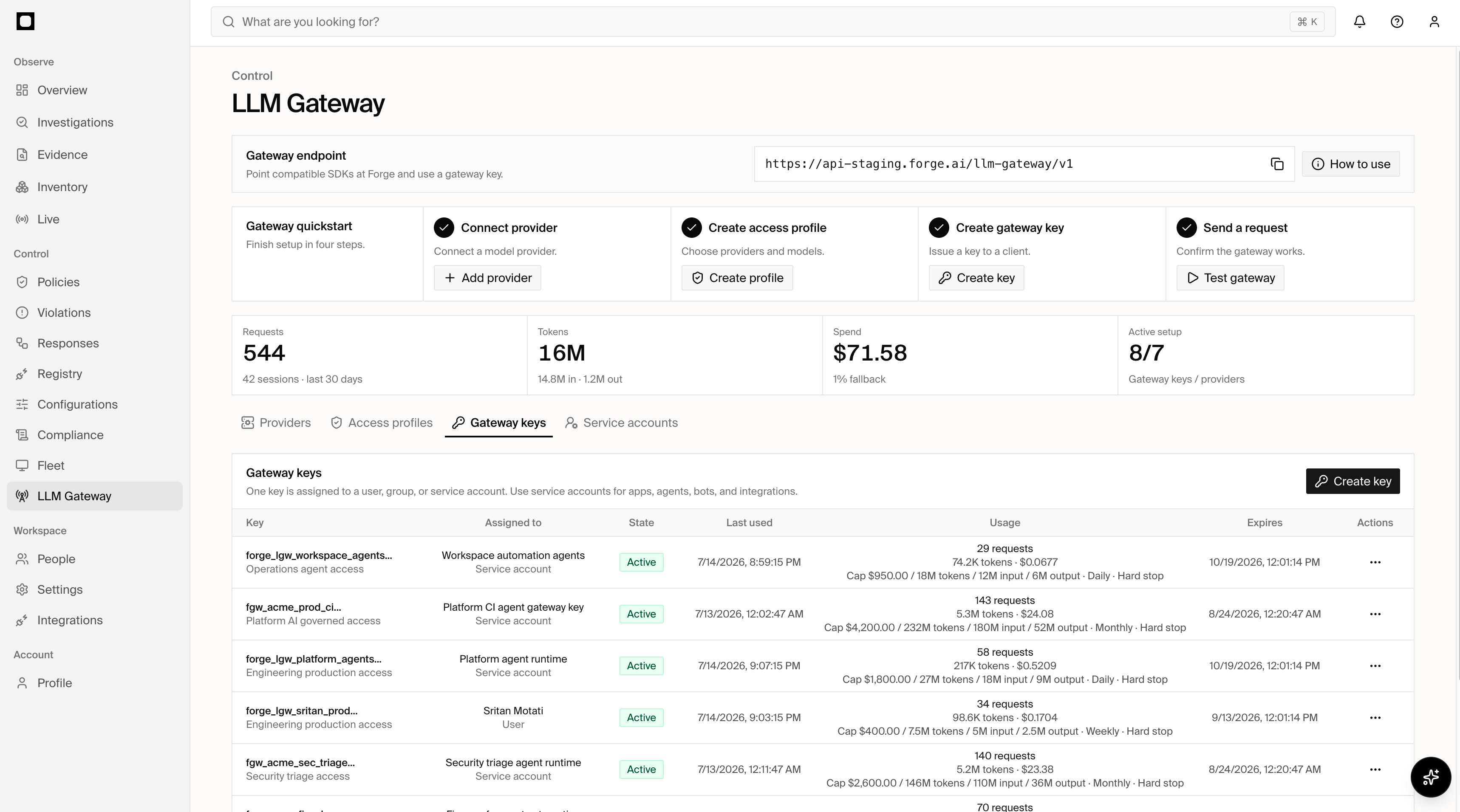
Gateway keys
Gateway keys authenticate callers and connect each caller to an access profile. A key binds one subject of typeuser, group, app, agent,
service_account, or customer_tenant.
Token classes include personal, group, service_account, app, agent,
customer_tenant, and exchanged. Keys can expire and can be rotated,
transferred, revoked, disabled, re-enabled, or deleted. Their runtime state is
active, revoked, or expired.
Use Filter beside Managed access to search keys and narrow the table by
access profile, assignment type, assignee, state, management, activity, or expiration. Filters
can be combined and cleared together.
Service accounts
Service accounts give non-human workloads a durable identity rather than sharing a person’s key. They can represent applications, agents, bots, and integrations. A service account records its owner, environment, rotation policy, and state. The owner can be a directory user, directory group, or app integration. States areactive, disabled, and archived.
Budgets
Budgets can be attached to an access profile, gateway key, or subject. A budget can enforce any combination of:- Spend in USD.
- Input tokens.
- Output tokens.
- Total tokens.
daily, weekly, monthly, rolling_24h,
rolling_7d, and rolling_30d. Calendar windows reset in UTC; rolling windows
move continuously. When either a configured spend or token limit is reached,
Forge blocks subsequent requests in that budget window.
You can set one optional Notify at percentage when creating a gateway key
budget. Forge sends an administrator notification when recorded usage first
reaches that share of any configured limit. The hard stop remains at 100%.
Calendar windows notify once per window; rolling windows notify again only
after usage has fallen below the threshold and later crosses it. The API accepts
metadata.warningThresholds: [80] on budget creation. Terraform managed access
overrides use alert_threshold_percent = 80.
The Console also offers a Spend alert in USD with optional email recipients.
It can be used without a hard limit, or set below a hard spend limit. Crossing
this threshold creates an alert without blocking requests. This is separate
from the percentage-based Notify at setting.
For department limits, use the department’s directory group under Manage
access. Confirm group membership and the effective assignment before rollout.
Requests must fit within every applicable budget. Separate person and group
limits can therefore apply to the same request.
Forge reserves budget before sending a request upstream and reconciles it with
reported usage afterward. Requests for multiple output candidates reserve output
capacity for all requested candidates. Concurrent requests can consume the
remaining capacity before a displayed usage total updates.
Cost comes from provider-reported usage, configured route pricing, or Forge’s
model pricing catalog. Missing rates or unsupported billing modifiers produce
unknown cost. Use models with known pricing when enforcing dollar budgets;
unknown-price reservations don’t guarantee a spend ceiling. Token limits
remain available independently of dollar pricing.
Switch an app
Point the existing SDK at the Forge endpoint and replace the provider credential with a scoped gateway key.Session continuity
To group multiple model requests from one logical agent interaction, generate a high-entropy session hint and send the same value unchanged on every request in that interaction:X-Forge-Session-Id response
header contains Forge’s canonical session ID for observability. Treat that
response value as read-only: continue sending your original hint rather than
using the returned canonical ID as the next request’s hint.
This continuity is required for Allow retry once approvals. Send the stable
client hint on the request that receives 403 with
X-Forge-Policy-Outcome: approval_required, approve the request in
Responses, and retry the identical model request with the same client hint.
The approved retry returns X-Forge-Policy-Outcome: allowed. A
single-invocation grant is consumed by that retry; another matching invocation
requires a new approval.
Do not replace the client hint with the canonical sess_lgw_... value returned
by Forge. Sending that canonical value as a new hint starts a different scoped
session and the approved grant will not match.
User attribution
The gateway key authenticates the application or service account. When the application acts for an end user, it can also pass a verified identity token:Policy checkpoints
Profiles and routes can invoke policies at three points:
The profile and route enforcement modes determine whether a matching policy is
observed, simulated, enforced, or processed under break-glass behavior. Tool
denials can stop execution or return a rewritten refusal when that behavior is
configured on the route.
Observability
Forge records the requested and served model, selected provider and route, identity, policy outcomes, tokens, cost, latency, retries, fallbacks, errors, cache hits, and denied tool calls for routed traffic. Gateway analytics include:- Request and session volume.
- Input, output, and total tokens.
- Provider-reported or Forge-estimated cost.
- Policy hits and denied tool calls.
- Route health, errors, retries, fallback rate, and cache hits.
- Bypass findings for observed traffic that did not use the gateway.
Streaming response headers
For a successful SSE response, Forge sends the policy result known before the stream starts inX-Forge-Gateway-Initial-Policy-Outcome (and its
X-Forge-Initial-Policy-Outcome alias). This is an immutable snapshot: HTTP
response headers have already been committed when later tool calls and tool
results are evaluated.
The final controlling result is therefore sent after the stream in the
X-Forge-Gateway-Policy-Outcome and X-Forge-Policy-Outcome HTTP trailers.
Clients that need the final result must use an HTTP stack that exposes response
trailers, or read the persisted request/session evidence in Forge. A client
that does not expose trailers can still use the initial outcome header without
mistaking it for the final tool-adjusted decision.
X-Forge-Phase-Timing-Scope: pre_stream_headers identifies streaming timing
headers as the phases completed before Forge commits the SSE headers. They do
not include subsequent stream consumption, tool-output evaluation, or final
persistence. Unary timing headers continue to describe the completed unary
request and do not carry this scope marker.